

Reviewing Corporate Photography: Selects, Retouching and Final Approval
Turn a contact sheet into an approved image library with placement-based selects, annotated retouching notes, crop tests and a handover record your next designer can use.

- Select an image for a named placement; approval of one crop does not approve every use.
- Give each photograph a stable identifier, a decision and a reason before commissioning retouching.
- Approve a representative treatment sample, then check the finished set together.
- Hand over approved masters, channel-ready exports and a clear record of permitted uses.
Start with the image you need to publish
The shoot is finished and a contact sheet has arrived. Several portraits look excellent, but the team is still debating favourites. Meanwhile, the website designer needs a wide banner and HR needs square staff profiles. This is the point where a good selection process becomes more useful than another round of voting.
Work backwards from the deliverable. List each placement, its purpose, crop, text position and approval owner. Keep three decisions separate: select the frame, approve the treatment, approve the finished use. A selected preview is not yet a publishable file.
Consider a hypothetical professional-services company preparing a staff-portrait campaign. It needs a website profile grid, a recruitment-page banner and a printed event programme. The examples below use invented image IDs and review decisions to show how the team could move from previews to a usable library.
Use selection labels that lead to a decision
Ask for previews with filenames visible and consistent. Keep the original image identifier through later versions: P014 can become P014_R02_Profile, rather than disappearing behind “final-final”. Review technical suitability at sufficient size before debating small differences in expression.
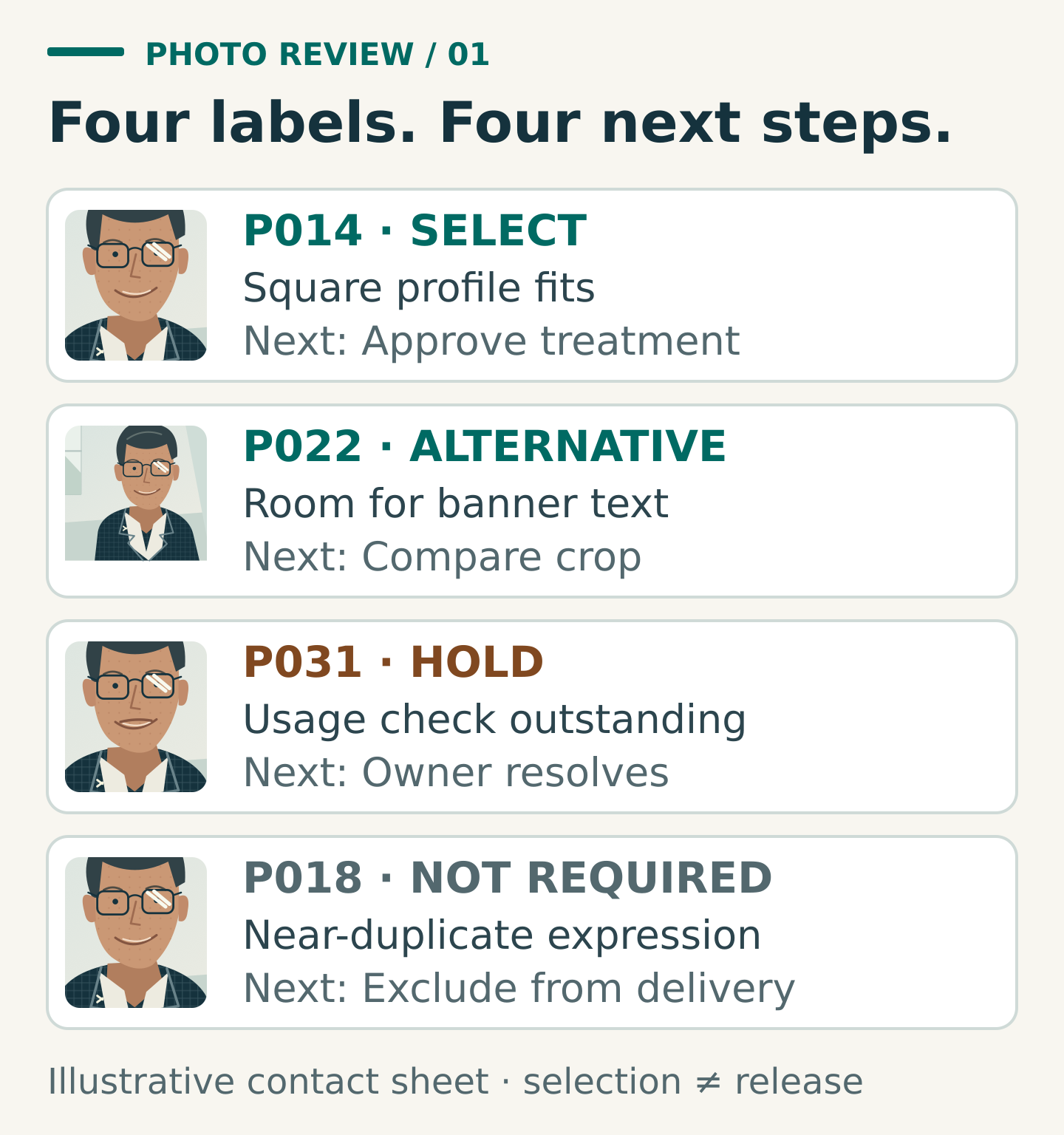
Use four labels with explicit criteria:
- SELECT: Fits a named placement, has a suitable expression and composition, and needs only an agreed level of correction. Record the placement beside the ID.
- ALTERNATIVE: A usable reserve that solves a specific problem, such as more space beside the subject. Name the selected image it could replace.
- HOLD: A decision is blocked by something identifiable, such as permission, crop feasibility or a factual concern. Name the person who will resolve it.
- NOT REQUIRED: A duplicate, unsuitable expression, technical problem or no current use. Keep it outside the approved delivery set.
In the example, P014 is SELECT for profiles; P022 is ALTERNATIVE for a banner because it has more background space; P031 is HOLD pending the permissions owner's check. “Selected” must not silently override that hold.
Invite relevant reviewers, but nominate one person to reconcile conflicting comments. Send the photographer one consolidated list, not competing screenshots with the filenames missing.
Compare the same photograph in its actual layouts
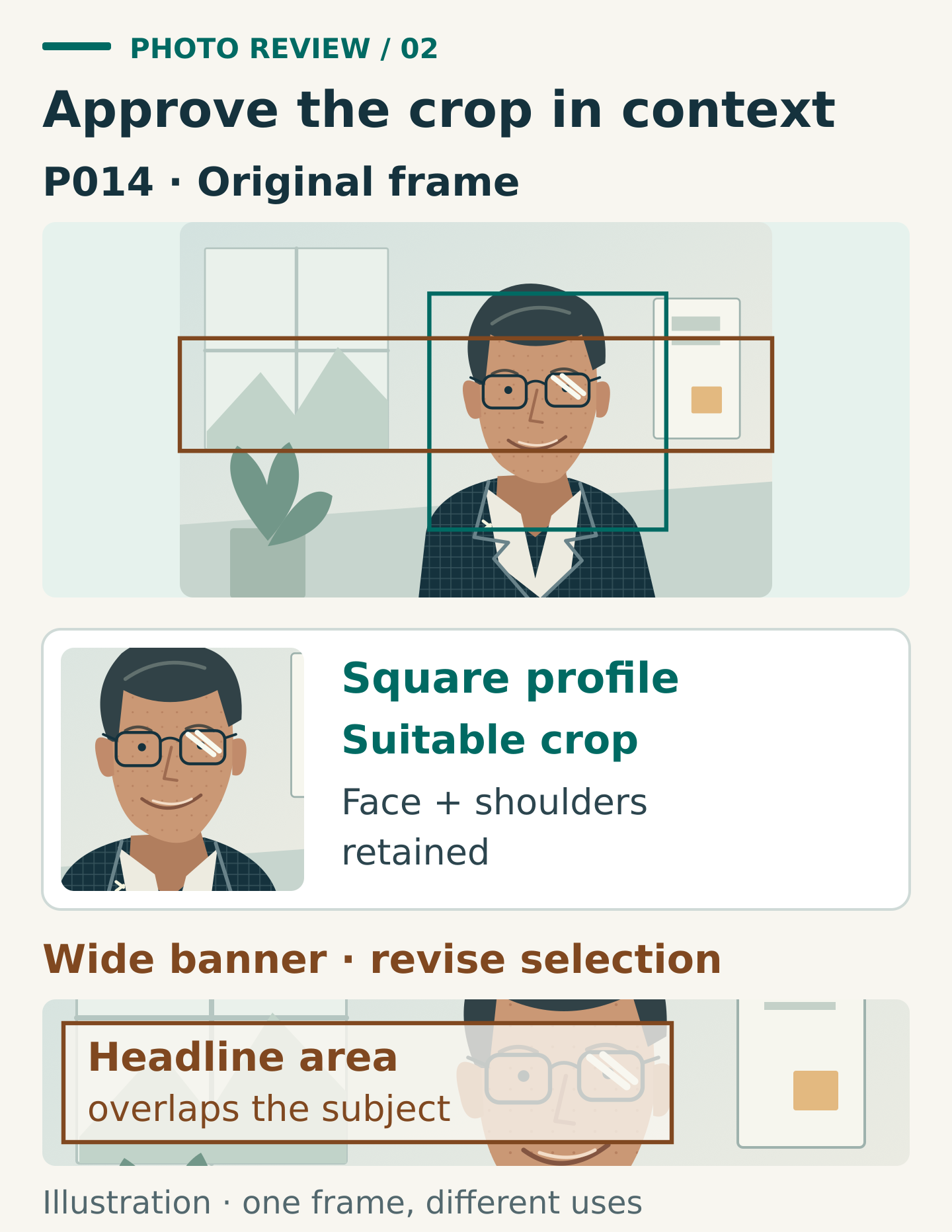
Place the candidate into a rough version of each destination before committing to extensive retouching. Include the real heading length and, for a website, inspect the mobile presentation as well as the desktop layout.
For P014, a square profile crop may retain the full face and enough shoulder to match neighbouring portraits. A wide crop may put the headline across the subject or remove the setting that explains their role. That does not make P014 a poor photograph; it means a different frame or layout is needed for the banner.
Record the result precisely: “P014 approved for square staff profiles; banner crop not approved. Test P022 with text on the left.” Review a printed placement at its intended size, including any space the designer needs around the trim. The crop proof should show what the audience will see, not just an attractive full-frame image.
Write retouching notes as location, change and limit
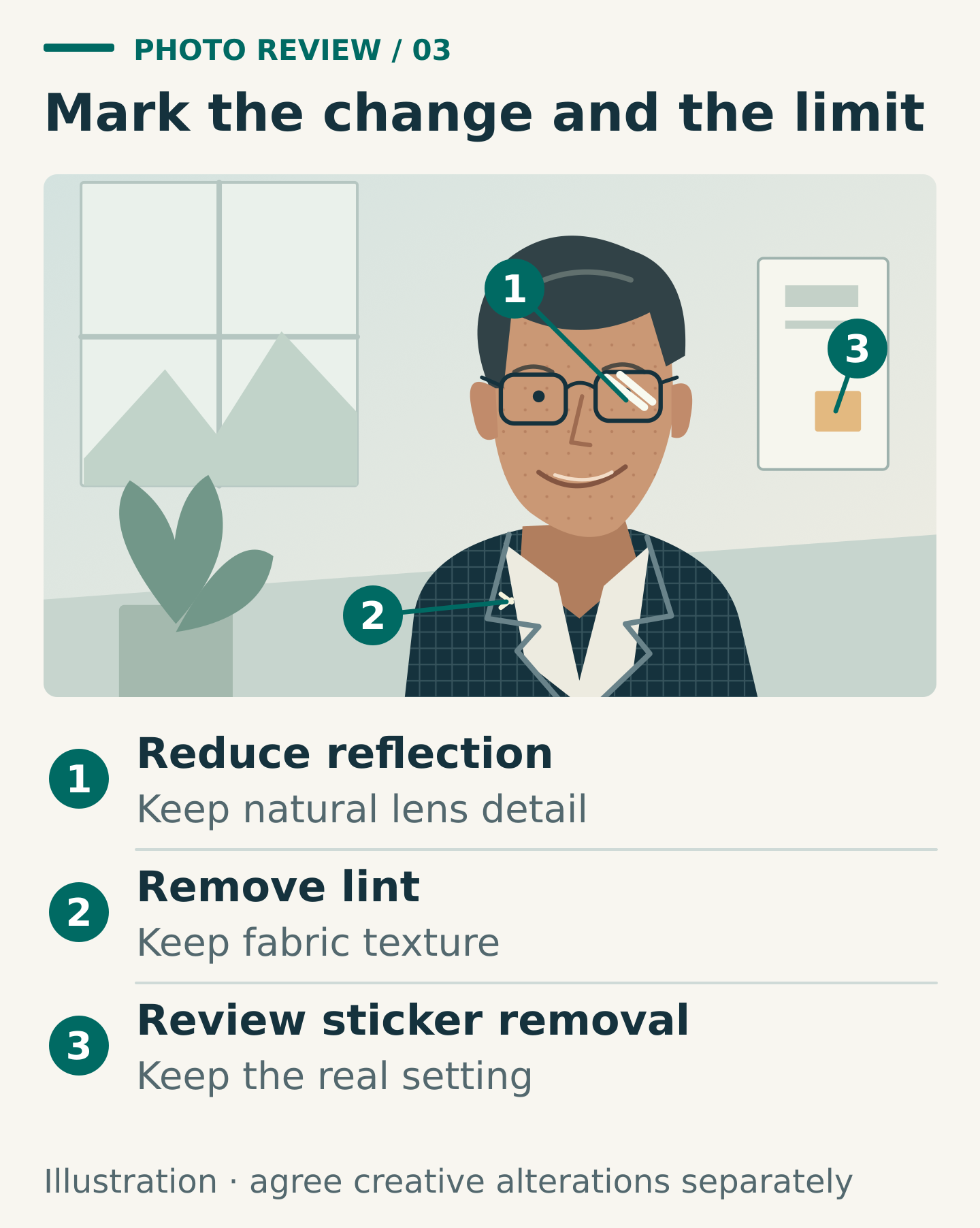
“Make it polished” leaves the retoucher to guess what matters. A useful annotation identifies a location, describes the intended change and explains what should remain. Put numbered markers on a preview and keep the full instruction in accompanying text.
For the hypothetical portrait P014:
- Glasses reflection: Reduce the bright reflection over the right lens enough to reveal the eye; preserve the natural lens edge and avoid inventing an eye detail that is not recoverable.
- Jacket lapel: Remove the visible lint at the marked spot; retain the weave, seams and normal fabric folds.
- Background display: Remove the distracting temporary sticker if approved by the communications owner; keep the actual room and permanent signage unchanged.
- Skin treatment: Reduce temporary distractions within the agreed treatment; preserve natural texture and distinctive features. Do not reshape the face or body without a separate, explicit discussion.
Separate corrections from creative alterations. Replacing a background, combining frames or reconstructing missing detail may change scope and what the photograph represents. Confirm the proposed approach before applying it across the library. If the requested change would imply a different product, workplace or activity, return it to the person responsible for the communication.
Approve a sample, then review the set together
Choose a small treatment sample that covers the actual variation in the shoot: indoor and outdoor light, glasses, different skin tones and clothing textures where present. Use it to agree contrast, colour, skin treatment and background handling before processing the remaining selects.
Inspect detail at a useful magnification, then return to the intended display size. Finally, place the portraits together. A technically tidy individual image can still look inconsistent beside the rest of the profile grid.
For colour-critical print, agree a proofing process with the designer and printer. Adobe explains that screen-proof reliability depends on the monitor, device profiles and viewing conditions. A casual phone-screen approval is therefore a poor basis for a precise print-colour decision. See Adobe's guidance on colour proofing.
Copy this acceptance sheet for each approved use
Use one record per image and important placement. This prevents “the photos are approved” from concealing an unresolved crop or permission check.
Illustrative completed record
- Campaign: Staff portraits, example campaign
- Image and treatment: P014, retouching version R02
- Placement: Website staff profile, square crop C01
- Selection: SELECT for this placement
- Retouching checks: Lens reflection and lapel lint reviewed; texture retained
- Layout check: Profile grid and mobile crop checked
- Usage check: Responsible owner records the applicable permission reference and any restrictions before release
- Decision: VISUAL APPROVAL ONLY; publication held until the usage check is completed
- Reviewer and date: Enter the actual approver and review date
- Remaining action: Permissions owner to complete the usage field
This example deliberately remains on hold. Change it to approved for release only when the named checks are complete. For a ready image, record the exact approved file and location so the designer does not have to infer which version won.
Close with a library someone else can use
Before accepting the final delivery, check:
- Every approved ID appears in the delivery index, with its treatment version and intended uses.
- Masters and channel-ready exports are distinguishable; superseded previews cannot be mistaken for approved assets.
- File types, pixel dimensions, crops, colour profiles and naming match the agreed delivery specification.
- Exported files open correctly, and a representative selection is checked in the actual website or design.
- Permission references, restrictions and any required credits are recorded by the responsible owner.
- The handover states whether original capture files or editable working files are included; do not assume they are.
- Outstanding holds have an owner and remain outside the publishable set.
The result should be a small, dependable publishing library with a clear route back to its approved masters. For help with selection, treatment or delivery, share your placement list and a sample contact sheet with Miracle.
Frequently asked questions
Should each staff member choose their own portrait?
Individual input can help identify uncomfortable expressions or factual concerns. Set the review remit and use one campaign owner to reconcile it with the placement, consistency and approval requirements.
Does approval of the master image cover every crop?
No. Record the important approved uses separately. A new crop can remove context, cut off a subject or place text over important detail.
When should we approve retouching across the full set?
After a representative sample establishes the treatment. Review the completed set together and check its final exports before release.
Planning something similar?
Talk to Miracle