

Retiring Website Content: Keep, Update, Redirect or Remove?
Use a four-way decision framework, a worked content review and a reusable URL register to retire outdated pages without abandoning their readers.

- Decide from continuing user need and record obligations, not page age alone.
- Map relevant successors individually and keep uncertain decisions with the owner.
- Verify the live response, destination, language and remaining links after release.
Ask what the next visitor still needs
An old page is not automatically a useless page. A previous annual report may be a valid historical record. A recently edited service page may still send visitors to a discontinued offer. Publication date alone cannot tell you which action is appropriate.
For a website owner, content retirement is a decision about the reader’s next step. Should the original information remain available, should it be corrected, or should an old address lead somewhere else? Treat that editorial decision separately from the technical change that delivers it.
Begin with the URL, purpose and responsible owner. Add language versions and linked files. Ask whether the page has a continuing audience, a current replacement or any record obligations requiring specialist input. If the owner is unsure, leave the decision open rather than interpreting silence as permission to delete.
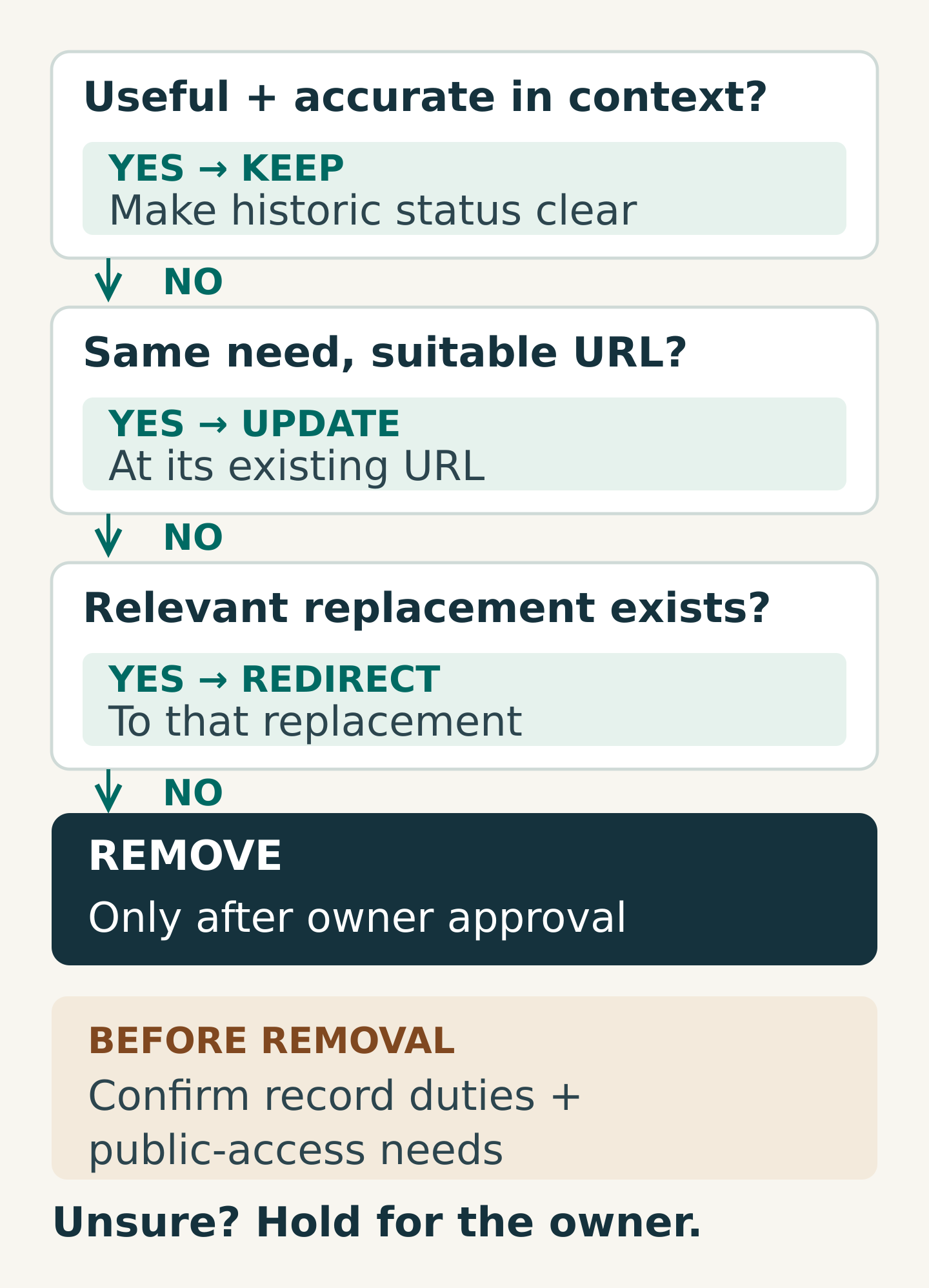
Use four decisions, with an explicit hold option
Keep when the page still serves a clear public purpose or must remain publicly available as a record. Make its status understandable. A past event page can say the event has ended and point to current events without rewriting the past as if it were current.
Update when the same address still answers the same reader need. Check the whole experience: copy, contact details, downloads, related links, images and language counterparts. A changed date does not justify creating a new URL if the underlying page remains useful.
Redirect when the content has a relevant successor. Ask whether someone following the old link would reasonably recognise the new page as an answer to their original question. A renamed service may qualify; an unrelated corporate homepage usually does not.
Remove when there is no continuing purpose, no required public record and no suitable replacement. Record approval and any internal retention requirement. The technical response should accurately communicate that the original content is unavailable.
Use hold for owner decision when the evidence is incomplete. This is a working status, not a fifth publishing treatment. Agree who will resolve it and what information is missing. Retention obligations belong with the organisation’s responsible records or compliance owner.
Worked example: four pages, four different outcomes
Imagine a professional-services business reviewing a small section of its website. These are fictional examples, not recommended decisions for every organisation.
- Annual report from an earlier year: the records owner confirms that it should remain public. Keep it with its original year and a clear route to the latest report.
- Current advisory service overview: the service remains available, but the team structure and brochure have changed. Update the existing page and verify every language version and download.
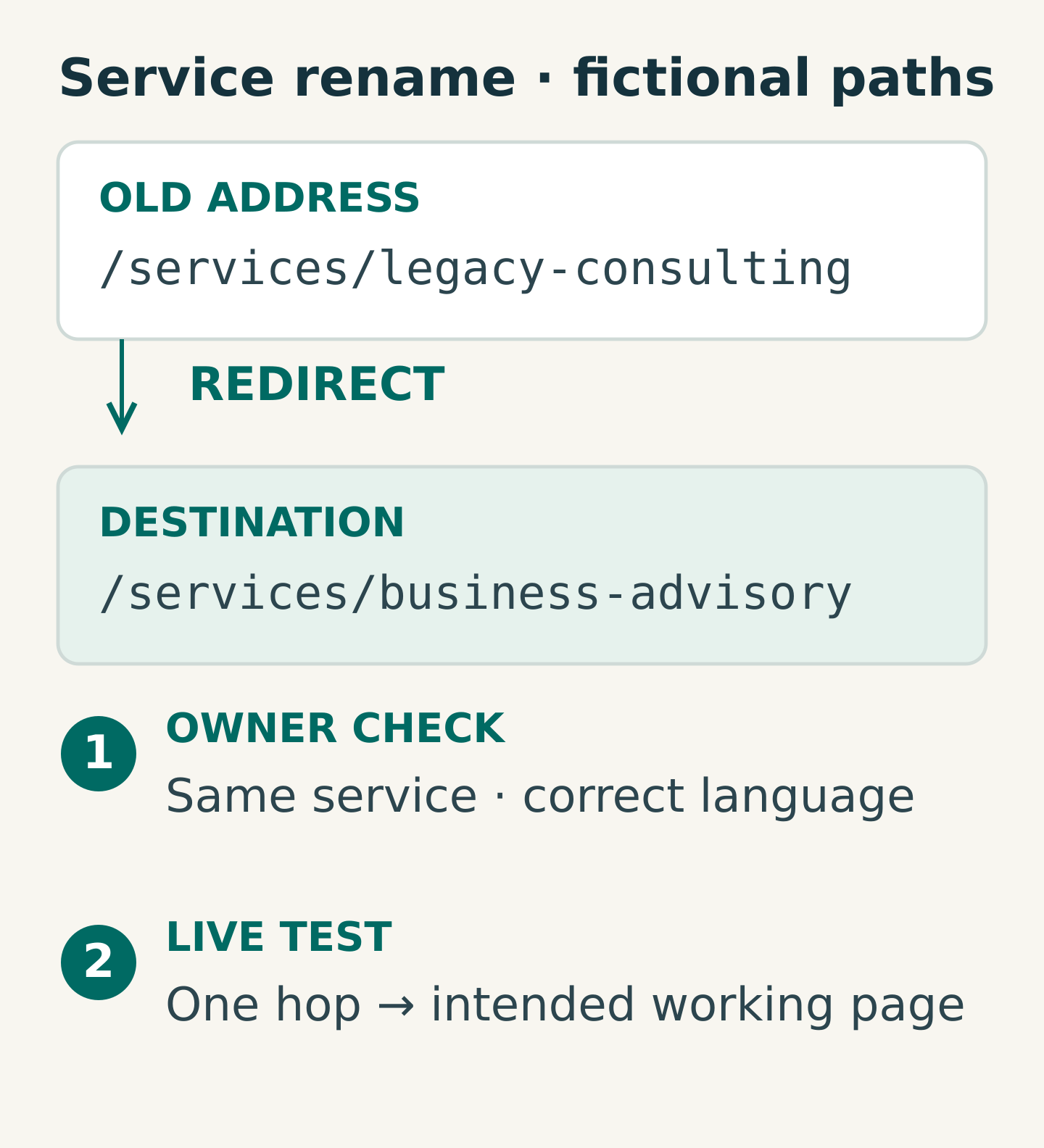
- Renamed consulting service: the owner confirms that the new advisory page covers the same service and audience. Redirect the old address to that approved successor.
- Expired promotional registration page: applications are closed, there is no enduring record purpose and no equivalent successor. Remove it with an appropriate missing-page response and update links that still promote registration.
The decisions differ because the purposes differ. “Delete everything more than two years old” would lose the report. “Redirect everything to services” would send readers of the closed promotion to an unexplained destination.
For the renamed service, also inspect its brochure. If the old PDF remains directly accessible, changing the page alone may leave visitors using obsolete information.
Copy a retirement register your team can act on
Use one row per affected address. Include files with their own URLs and separate language addresses rather than hiding them inside a general comment.
- Current URL, content title and language
- Reader need and responsible owner
- Evidence reviewed: current usefulness, known links and relevant usage
- Decision: keep, update, redirect, remove or hold
- Reason and approving owner
- Replacement URL, where applicable
- Related pages, files and campaigns to change
- Required technical action
- Release status, test evidence and follow-up owner
An example entry might read: “Old consulting address → new business advisory address; same service, confirmed by service owner; permanent redirect requested; English and Chinese mappings listed separately.” The technical team can then implement the agreed mapping without guessing editorial intent.
Use traffic and incoming-link information as evidence, not as an automatic deletion rule. A low-traffic page may still support an important contract, customer or seasonal need. Equally, traffic does not make inaccurate information safe to leave unchanged.
Match the technical response to the decision
For permanently moved content, Google’s redirect guidance distinguishes permanent redirects, including HTTP 301 and 308, from temporary moves. Have the technical team choose the appropriate implementation for the actual change.
Google’s site-move guidance recommends mapping corresponding destinations, avoiding unnecessary redirect chains and avoiding irrelevant bulk redirects to a homepage. Several old pages can legitimately lead to one consolidated page when that page genuinely replaces their content; the relationship must be editorially defensible.
Where content is removed without a replacement, ask the team to use an appropriate missing-content response, such as 404 or 410. Google’s HTTP-status documentation explains that such responses are treated as missing content for indexing. A friendly error-page design should not accidentally return a success status for a missing page.
Do not promise that a redirect will preserve every ranking or visitor. Its immediate job is to provide an accurate route. Search processing and other factors still need observation.
Check the route after the change is live
A completed register records the plan; live tests establish whether the website behaves correctly. Test important affected URLs directly after release, including copied links from old emails or bookmarks where available.
For a redirect, confirm the old address reaches the intended working page without a loop or unnecessary intermediate hop. Read the destination: does it fulfil the original need, in the expected language? For removal, verify the missing-page response and useful navigation. For retained material, check that historical status and current information are easy to distinguish.
Then check the surrounding routes:
- Navigation, related-content links and site search
- Download links and directly accessible old files
- Active campaign destinations and QR-code landing pages
- Language links, canonical references and sitemap entries as applicable
- Search-reporting issues and unexpected errors after release
Keep a named owner for corrections discovered afterwards. Redirects also need a maintenance plan; do not let a future redesign unknowingly delete the mappings. For wider site moves, Google advises keeping redirects for at least a year and, from a user perspective, considering longer retention.
Your next step
Choose one manageable group of outdated pages, such as a discontinued service and its related downloads. Fill in the register, ask the owner to approve each treatment and identify the live checks before any change is made.
Bring the register and known replacement pages to Miracle when planning a content review. Clear decisions help the editorial and technical teams deliver the same outcome, with fewer assumptions between approval and release.
Frequently asked questions
Should old articles automatically be deleted?
No. Check continuing usefulness, historical context, incoming links and record obligations. Some articles should remain with clearer context; others need updating or retirement. Age is a review signal, not a sufficient decision.
Can every retired page redirect to the homepage?
That usually gives readers an irrelevant destination. Use a specific successor when one exists. If there is genuinely no replacement, handle the missing content accurately instead of disguising it with a generic redirect.
Who should approve removal?
The content owner should approve the editorial treatment, with records or compliance input where needed. The technical team should implement and verify the response. If ownership or obligations are unclear, keep the item pending until the responsible person decides.
Planning something similar?
Talk to Miracle