

Mobile App or Responsive Website: Start with the User’s Task
Choose a delivery format with a capability test, a realistic worked example and a one-page decision brief that includes adoption and operational ownership.

- Define the task and operating conditions before choosing a delivery format.
- Test any critical device or offline requirement on the actual target environment.
- Compare adoption, support and release responsibilities alongside development scope.
Write the task before choosing the format
“We need an app” leaves the most important questions unanswered: who will use it, what will they accomplish and why will they return? A more useful brief describes a task, such as “a member checks availability and books the next session” or “a customer finds arrival instructions from a message”.
Add the context. Does the task happen every week or once a year? Is the person at a desk, in transit or somewhere with unreliable connectivity? Are they already signed in to another service? What fails in the current experience?
This guide helps a business team compare a responsive website with an app without jumping straight to a screen list. The aim is a defensible first-release decision, including the conditions that could change it.
Compare the same journey across three routes
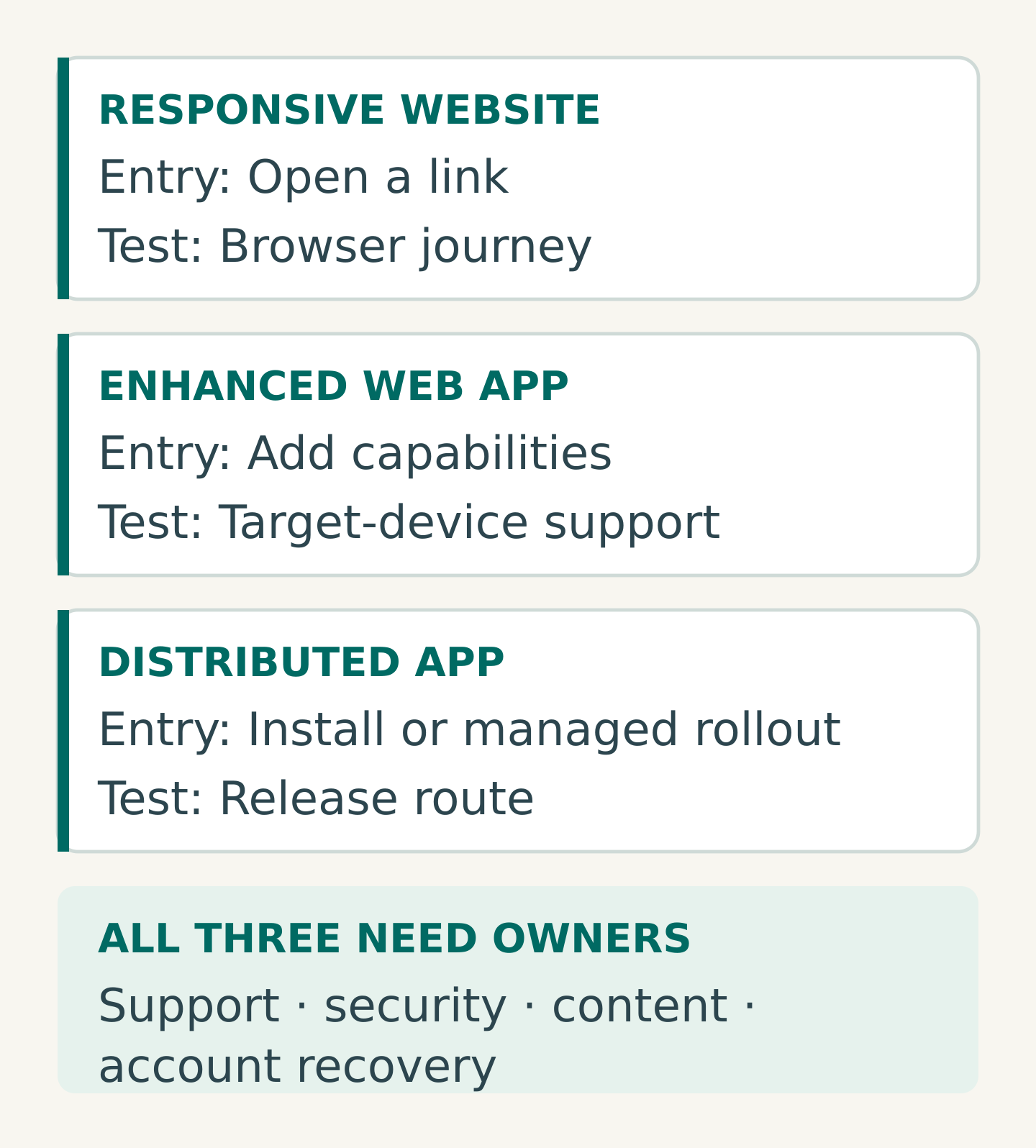
Consider three possible routes rather than assuming the only choices are a static website and a native app.
- Responsive website: the visitor opens a link and completes the task in a browser. Review the entire mobile journey, including authentication, errors and confirmation.
- Enhanced web app: a website adds capabilities such as installation or offline behaviour where supported. Ask exactly which capabilities work on the target devices and under which conditions.
- Distributed app: a native or cross-platform application reaches users through the chosen distribution route. Include installation, account access, updates and return visits in the journey.
These labels describe delivery approaches, not automatic quality levels. A poorly designed website does not establish that the task needs an app. Equally, a working browser prototype does not prove that it meets every operational requirement.
For occasional visitors following a campaign link, an installation step needs a convincing benefit. For a recurring service, a convenient return path may be more valuable. Test that assumption with the intended users rather than treating frequency alone as a verdict.
Test the requirement most likely to change the choice
Replace broad feature words with observable conditions. “Offline” could mean reading a saved agenda, capturing a draft inspection or safely synchronising conflicting edits later. Those are different requirements.
A useful capability test states:
- The action: what the user must accomplish
- The environment: device, operating system, browser and connection
- The failure condition: what happens when permission, connectivity or storage is unavailable
- The acceptable outcome: what evidence shows that the task succeeded
Web capabilities are more nuanced than a simple yes/no comparison. Google’s PWA offline-data guide describes storage options used for offline web experiences. That makes offline support a requirement to investigate, not an automatic argument for or against an app.
Notifications also need precise conditions. WebKit documents web push for Home Screen web apps on iOS and iPadOS, including permission requested after a user interaction. “We need notifications” alone therefore does not establish that a native app is necessary. Verify current support and the actual permission journey for your audience.
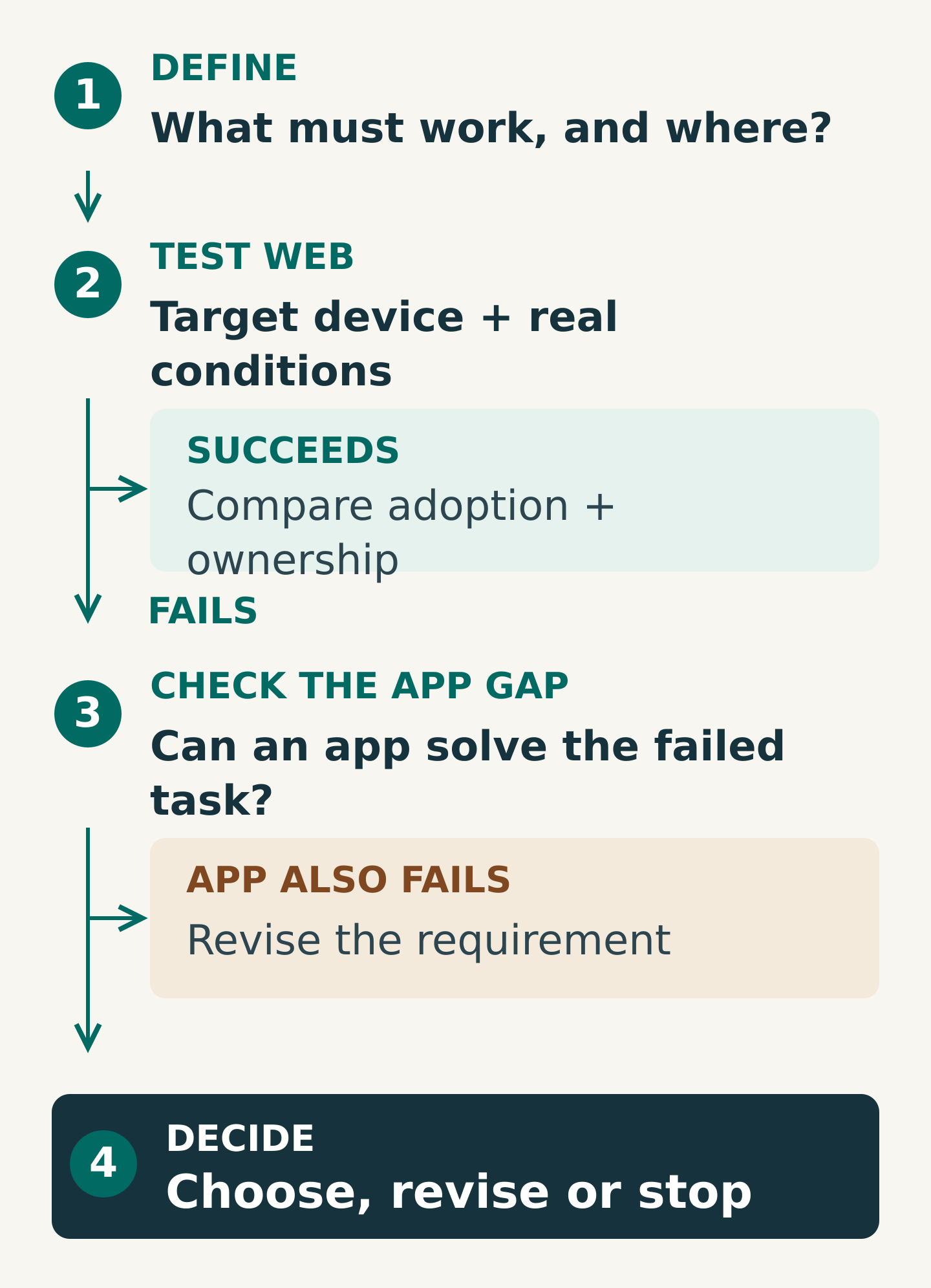
If a critical web capability fails the test, check whether a proposed app actually resolves it. If neither approach meets the requirement, revise the task or constraints. Do not hide an unproven capability inside a quotation assumption.
Worked example: a field-service team
Imagine a maintenance business whose staff currently read job instructions from a mobile website. They work at customer sites with patchy connectivity and want to attach photographs and completion notes. This is a hypothetical planning example, not a client case.
The first brief says “build an app that works offline”. The team rewrites it as: “Open previously downloaded job instructions without a connection; save a draft note and photograph; show what has not yet been sent; confirm receipt after reconnection.”
Now the technical team can test a narrow prototype on the devices staff actually use. The tests include closing and reopening the experience, losing the connection during submission, retrying and signing out. They also ask what happens if a job changes while a saved copy is offline.
Suppose the web prototype meets the essential task on the supported devices. The business can compare that route with an app on usability, rollout and ownership rather than commissioning an app by default. If an essential requirement remains unreliable, it can test the proposed app against the same conditions.
The decision is conditional on evidence. Nothing in this example promises that either approach will handle offline work automatically or safely without deliberate design.
Compare the work after launch
Ask each proposal to identify the owner of content, support, security maintenance, account recovery, monitoring and releases. Include the service behind the interface: an app and a website can both depend on an integration or API that needs maintenance.
For an app distributed through Apple’s App Store, plan the submission and update workflow. Apple states that apps and app updates submitted through App Store Connect are reviewed. Other distribution choices have their own requirements, so the proposal should name the route rather than assume it.
Compare the same lifecycle categories across options: implementation, testing, hosting or backend services, integrations, distribution administration, maintenance and support. Ask which recurring costs are included and what triggers additional work. There is no useful universal price ratio between “an app” and “a website” without a defined scope.
Also name who controls the relevant accounts and who can release a correction when the original project team is unavailable.
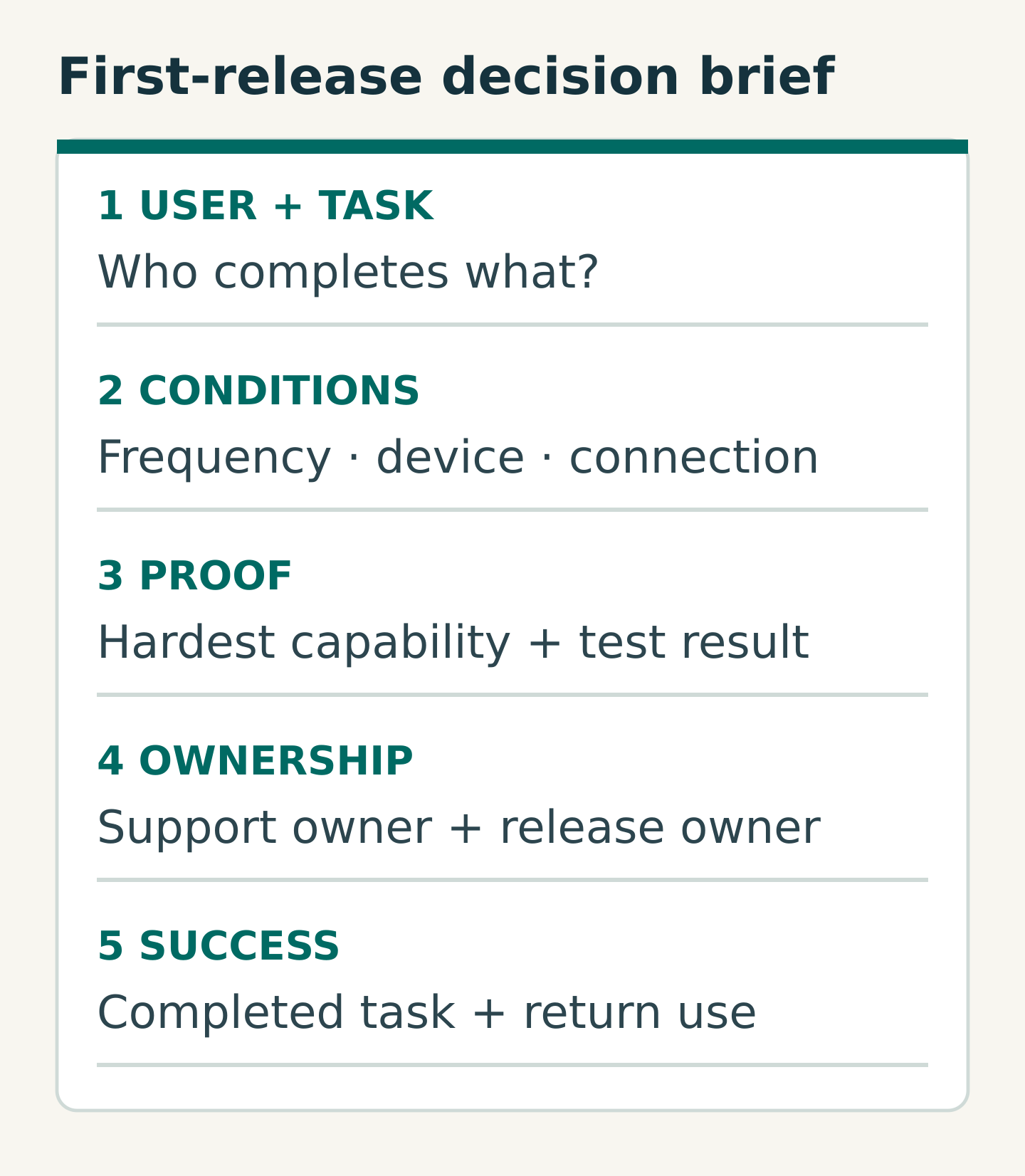
Copy this one-page decision brief
Use these prompts before asking for competing quotations:
- Audience and task: who completes what, and why it matters
- Frequency and entry: how often they return and how they first reach the service
- Conditions: target devices, connection limits, languages and accessibility needs
- Essential capabilities: observable requirements, test results and unresolved questions
- First release: one complete task, including failure recovery and confirmation
- Operating owners: content, support, security and release responsibilities
- Dependencies: accounts, existing systems, data flows and distribution route
- Success evidence: task completion, support problems and meaningful repeat use
- Decision and review trigger: chosen route, reasons and what new evidence would change it
Keep later ideas in a separate list. Each should have a reason to revisit it, such as observed task failure or repeated user demand. A long menu of possible features is not a first-release definition.
Make a bounded decision, then test it with users
Use a short sequence of questions. Can a responsive web journey meet the essential task? If yes, compare its adoption and operational fit. If not, does an app demonstrably resolve the gap? Is there a credible reason for people to install or return, and an owner who can keep it working?
An unknown answer on a critical requirement calls for evidence before commitment. A positive technical answer still needs a usable end-to-end journey. Measure whether people finish the task and return when it is relevant, rather than celebrating a count of screens or installations alone.
Your next step is to complete the decision brief and test the hardest assumption. Share it with Miracle when discussing an app or website project so the proposed format follows the user’s task and the business’s ability to operate it.
Frequently asked questions
Is an app always better for mobile users?
No. The answer depends on the task, entry route, operating conditions and reasons to return. Test the same complete journey across plausible options, including permissions, account recovery and failure states.
Can a website support notifications or offline use?
Some web experiences can, subject to implementation and platform conditions. Specify what must work, verify current official platform documentation and test on the target devices. A general capability statement does not prove your particular workflow.
Should we build both at the same time?
Only when each has a clear role and the team can operate both. A focused first release may establish which additional format is genuinely useful. Reuse of content or code depends on architecture and should be assessed rather than assumed.
Planning something similar?
Talk to Miracle