

Measuring Qualified Website Enquiries Without Confusing the Numbers
Use a clear qualification rule, a worked counting example and a monthly reporting worksheet to connect website activity with genuine business enquiries.
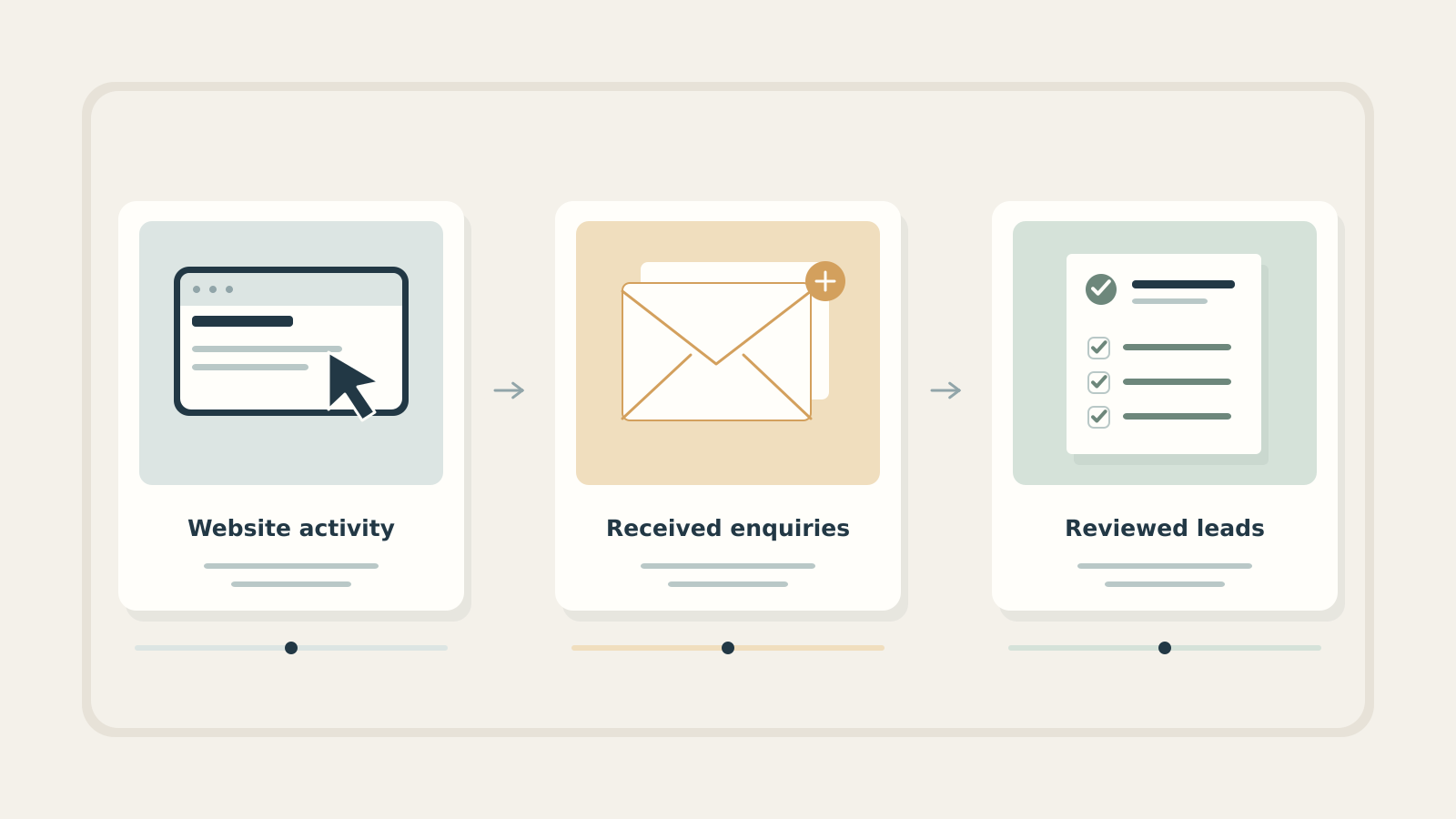
- An interaction, accepted submission and qualified enquiry are different units.
- Use a consistent received-date cohort and show what is still awaiting review.
- Reconcile analytics separately from the business enquiry log; do not force unlike totals to match.
Start with the decision your report must support
Your monthly website report shows more visits and more form activity. The sales team says it has not seen more suitable opportunities. Both observations may be accurate because the two teams are counting different things.
For a B2B website, a useful question is: “How many distinct, relevant requests did we receive, and what should we change next?” Answer it with a modest enquiry log and clear definitions before building a more elaborate dashboard.
Keep traffic as context. It helps you understand reach and changes in visitor behaviour. But traffic, button clicks and enquiries should not share a headline label such as “leads” unless they genuinely measure the same thing.
Write down the unit at each stage
Use these working definitions:
- Website interaction: a measured action, such as clicking an email link or beginning a form.
- Accepted submission: a request the form system confirms it has received. A submit-button click alone is insufficient evidence.
- Distinct enquiry: a genuine request after removing identified tests, spam and duplicate records under an agreed rule.
- Qualified enquiry: a distinct request reviewed against the business’s qualification criteria.
A visitor can click an email address without sending a message. One person can submit two different projects. A repeated submission can refer to the same request. Decide what you count as one enquiry rather than assuming one visitor, event or email address equals one opportunity.
Google provides recommended events such as generate_lead and qualify_lead, but their meaning depends on the information sent by the implementation. Its Lead acquisition report describes the corresponding metrics as unique users with those events. That is not necessarily the same unit as distinct enquiry records in your CRM.
Agree qualification before comparing campaigns
Ask the person who handles enquiries to complete this sentence: “We consider a request qualified for sales follow-up when…” A useful starting rule might require a service you offer, an identifiable need, a reachable contact and a location you can serve.
Record how to treat recruitment messages, supplier approaches, customer support and genuine requests outside your offer. These contacts may deserve a response even when they are not new sales opportunities. Route them appropriately instead of labelling everything unwanted as spam.
Keep “awaiting review” separate from “not qualified”. Missing detail may require a conversation. Also agree when two records represent the same request; two messages from one company are not automatically duplicates.
For a small team, a short shared definition with a version date is enough to begin. Have two colleagues classify a handful of sanitised examples independently. Discuss disagreements before using the rule in a management report.
Work through one month without losing the denominator
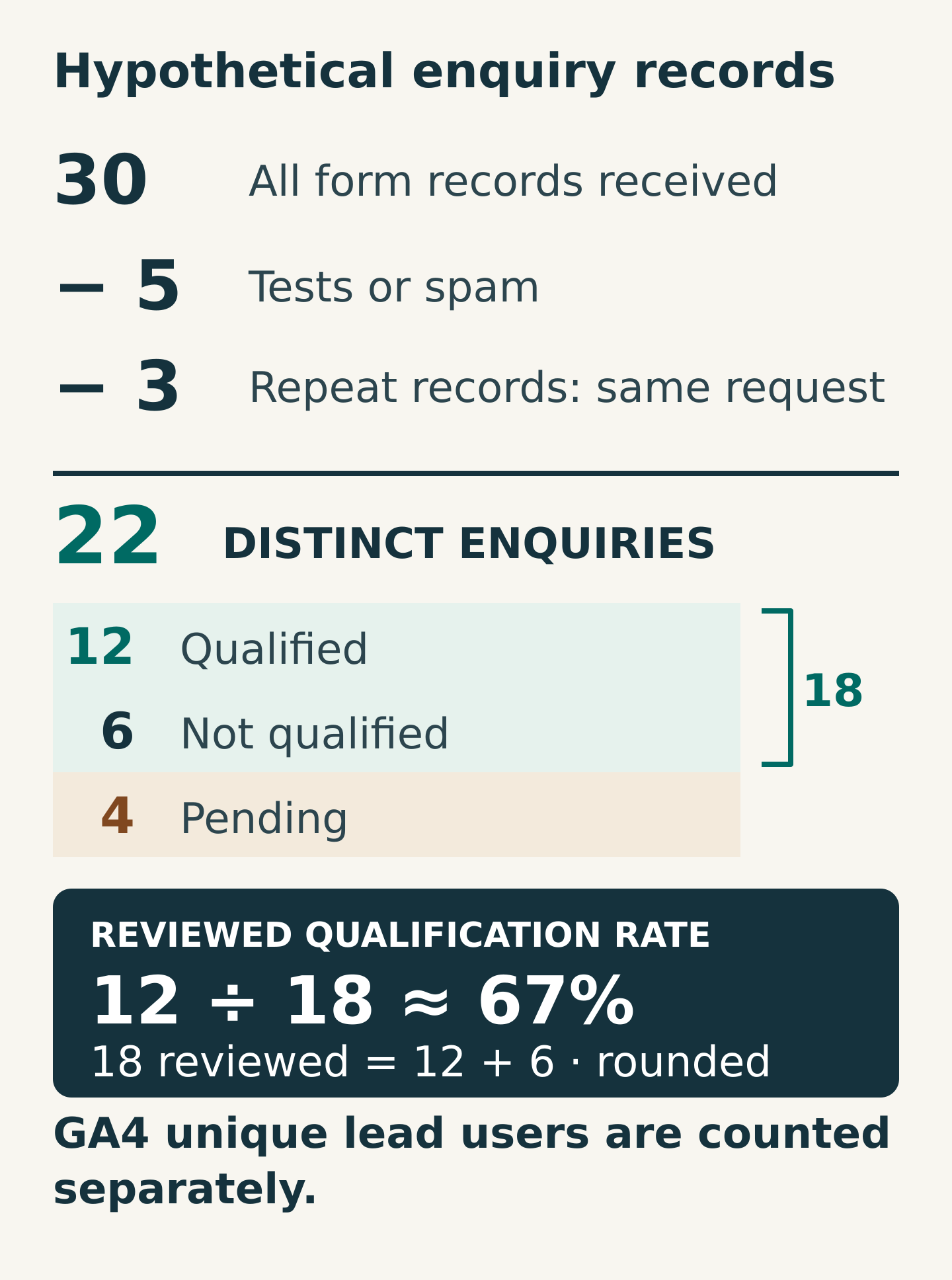
Consider this hypothetical month. The form system contains 30 received records. Five are tests or spam, and three repeat existing requests. That leaves 22 distinct genuine enquiries. In this example, there are no additional non-sales contacts to separate out.
By the reporting cut-off, 12 are qualified, six are not qualified and four still await review. Therefore:
- Distinct enquiries: 22
- Reviewed enquiries: 18, calculated as 12 + 6
- Reviewed qualification rate: 12 ÷ 18 = approximately 67%
- Review coverage: 18 ÷ 22 = approximately 82%
- Awaiting review: 4
The 67% figure describes reviewed enquiries only. It does not establish that 67% of all enquiries, website visitors or form events were qualified. If you report 12 ÷ 22 instead, label it the share currently qualified among all distinct enquiries; the pending cases can still change that result.
Define the cohort as enquiries received during the month and state the review cut-off date. If a late review changes the totals, update that cohort or clearly explain the reporting convention. Mixing enquiries received this month with qualifications completed this month can produce a rate whose numerator and denominator refer to different requests.
These figures demonstrate the method. They are not Miracle results, benchmarks or a forecast.
Reconcile tracking as a separate exercise
Compare accepted form records with analytics success events using the same period, time zone, forms and language versions. First confirm that you are comparing event counts with records, not a unique-user metric with records.
Investigate differences. Tracking may be unavailable for some visits, an event may fire twice, or a success message may appear before the system has genuinely accepted the submission. Do not edit the business log merely to make it match analytics.
Ask the implementation team to test these cases:
- Valid submission accepted by the form system
- Required information missing or rejected
- Double-click, retry or repeated attempt
- Success-page refresh or return visit
- Every language version and relevant form variant
Record the expected event behaviour for each case and verify it. Keep test records identifiable and excluded from the business totals. Google’s recommended event reference helps the technical team select lead-stage events, but event names do not supply a qualification decision by themselves.
If source information is missing, keep an “unknown” category. Do not guess the marketing channel from a colleague’s recollection or attribute every request to the last campaign launched.
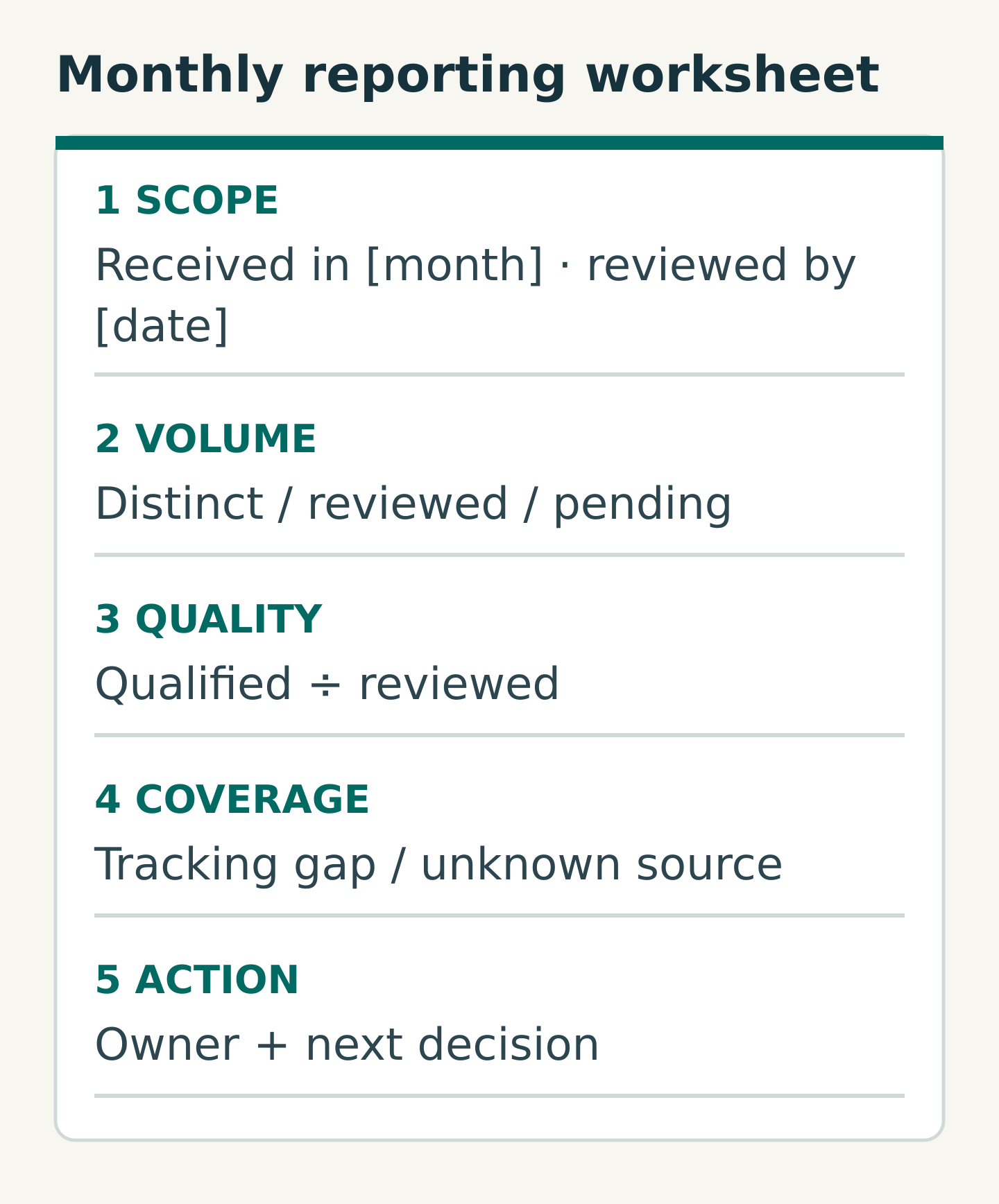
Copy this monthly reporting worksheet
Keep the enquiry detail in the approved CRM or controlled log. A useful record includes an internal reference, received date, channel, request category, duplicate reference where relevant, review status, qualification reason and responsible owner. Only capture source information that is available and appropriate.
The management cover sheet can be much simpler:
- Scope: received-date range, time zone, review cut-off and definition version
- Volume: records received, exclusions, duplicates and distinct enquiries
- Review: reviewed, qualified, not qualified and pending
- Calculation: named rate, numerator and denominator
- Coverage: tracking discrepancies and unknown-source totals
- Decision: one finding, next action, owner and review date
Keep names, email addresses, telephone numbers and free-text messages out of ordinary analytics event parameters, page URLs and page titles. Google’s guidance on avoiding personally identifiable information explains these leakage risks. Any connection between CRM outcomes and analytics needs an approved implementation and privacy review; a reporting requirement is not a reason to copy raw customer information into another system.
Use the report to choose one next action
Interpret the pattern before changing the website. Many pending cases may indicate a review backlog. Many genuine but irrelevant requests may call for clearer service boundaries or better routing. A tracking discrepancy calls for measurement repair before a claim about demand.
Use counts alongside percentages, especially when volumes are small. One differently classified request can move a percentage sharply. Annotate changes to forms, campaigns and qualification rules so a later comparison remains understandable.
Your next step is to reconcile one completed month with the colleague who answers enquiries. Agree the definition, explain the exclusions and retain the pending cases. Bring that worksheet to Miracle when discussing enquiry measurement: it makes clear which business question the website reporting needs to answer.
Frequently asked questions
Can a form submission be counted as a qualified lead?
Only after it meets the agreed qualification rule. A successfully accepted form establishes receipt, not suitability. Keep pending review visible, and make any automatic qualification logic explicit and testable.
Why does GA4 show a different number from our CRM?
Check the unit first: a report may count unique users while the CRM counts requests. Then compare dates, time zones, tracking coverage and duplicate behaviour. Differences need explanation; they do not automatically mean that either system should be adjusted to match the other.
Does better measurement produce more enquiries?
Measurement can reveal a routing problem, a review backlog or an unreliable event. Fixing those issues supports better decisions, but tracking alone does not create demand or guarantee a sales outcome.
Planning something similar?
Talk to Miracle