

Putting Video on Your Corporate Website: What to Specify Before Development
A finished film is only part of a website video brief. Agree playback, posters, captions, loading and fallback behaviour before the page is built.

- Decide whether the video explains something or simply sets a visual mood.
- Approve the poster, playback controls and mobile behaviour as part of the page.
- Plan captions and other alternatives around the information in the film.
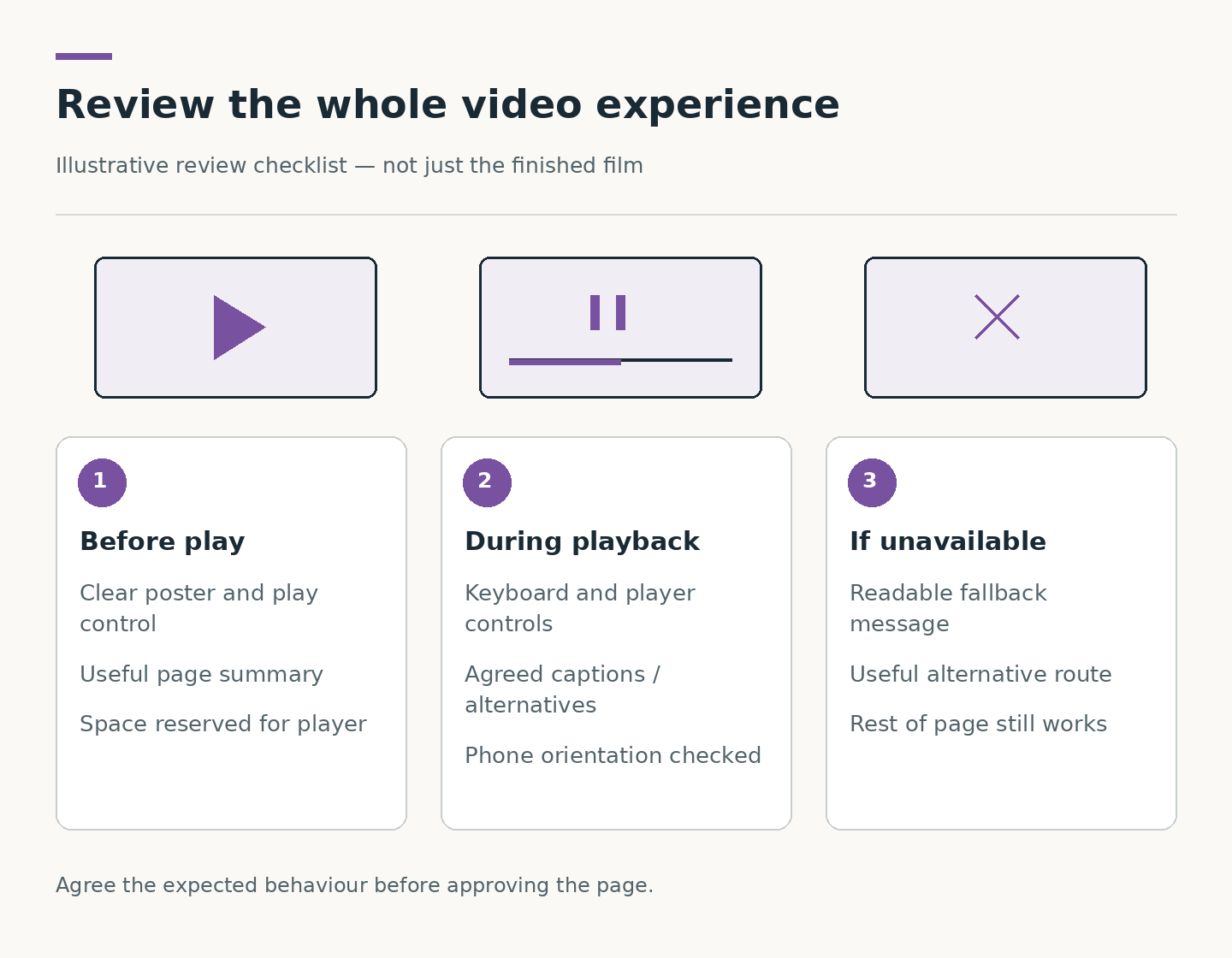
- Test the experience before playback, during playback and when the player fails.
Start with the job of the video
A corporate film can introduce a business, demonstrate a product or help visitors understand a complicated service. A decorative loop has a different job: it creates atmosphere while the page carries the message. Before choosing a player, write down what a visitor should learn and what they should do next. If a person never presses play, the surrounding heading, summary and next step should still make sense.
This is a website decision as well as a production decision. “Add our video to the homepage” leaves several unanswered questions. Is watching essential? Is sound necessary? Should the film occupy the first screen, appear further down the page or open only when requested? Answer these questions before approving a layout. Include these decisions in the same approval record as the page design.
Treat the first frame as a separate deliverable
The poster image is what people see before playback begins. Choose it deliberately rather than accepting a random frame from the film. Check its crop on a narrow phone, the contrast of any play button and whether a visitor can tell that the image launches a video. Keep essential wording in the page rather than relying on lettering inside the poster.
Ask for a clean poster asset, an approved alternative text or accessible player label, and the intended aspect ratio. If a hero area uses a different crop from a content-page player, document both. The website team should not have to guess which face, product or detail can be cropped away.
Agree what happens when someone presses play
For an explanatory film, visible controls and deliberate playback are often a sensible starting point. Specify sound, full-screen behaviour, keyboard operation and what happens when playback ends. If a decorative loop is proposed, ask what replaces it for visitors who prefer reduced motion, and how essential information remains available without the animation.
Compare a hosted player with a directly served video against actual needs: editorial replacement, captions, playback features, third-party dependencies and ongoing ownership. Neither choice is automatically right for every project. Record who controls the hosting account and who can replace a film after launch.
Plan alternatives before the final edit
W3C guidance distinguishes prerecorded video, live video and audio-only material. The required alternatives depend on what information the media communicates. A spoken explanation may need captions; important visual information may need description or a descriptive transcript. Translation subtitles and accessibility captions also serve different needs. Confirm the intended audience and project requirements with the team rather than treating one caption file as a universal solution.
Include caption review in the approval process. Names, specialist terms, punctuation and timing need checking. Provide a useful text introduction beside the player and decide where a transcript belongs. These are content deliverables, not details to leave until the development deadline.
Keep the rest of the page useful while it loads
Video loading should reflect placement and purpose. A player well below the first screen does not necessarily need to fetch everything immediately. Web.dev describes different loading approaches for native video and embedded players; browser support and the selected player still need testing. Ask the developer to explain the chosen approach in terms of what a visitor sees, not just an attribute in the code.
Test on a slower connection and on an actual phone. Check that space is reserved for the player, text does not jump unexpectedly, and the page remains usable while media is unavailable. A poster and a clear fallback link can be more helpful than an empty rectangle or an endless spinner.
Approve the page, not only the film
Use a short acceptance list: poster visible; play control identifiable; keyboard controls usable; captions selectable where supplied; orientation changes handled; surrounding links reachable; and a sensible failure state. Test the published hosting configuration, because a player that works inside an editor may behave differently on the public page.
Miracle’s CUHK 2026–2030 Strategic Plan case combines a website with a homepage promotional film. It illustrates the relationship between a short introduction and deeper page content, not a claimed conversion result. When briefing a similar project, share the film’s purpose, page position, audience and update owner with the website and video teams together.
Plan your website project
Explore Miracle website design and development
Related project: CUHK 2026–2030 Strategic Plan
Sources and further reading
Frequently asked questions
Should a corporate website video autoplay?
Not by default simply because it can. Decide whether motion is decorative or necessary, whether sound is involved and how visitors can control it. Review mobile behaviour and reduced-motion alternatives before approving autoplay.
Can we provide only a video file to the developer?
Provide the approved file or hosting reference, poster, captions or other agreed alternatives, playback requirements and an owner for future updates. The file alone does not define the website experience.
Will adding video improve enquiries or search rankings?
It may help visitors understand the offer when it answers a useful question, but neither outcome is guaranteed. Judge its role in the user journey and measure agreed results rather than assuming that adding a player creates improvement.
Planning something similar?
Talk to Miracle