

How to Write a Corporate Event Brief in Hong Kong
A practical corporate event brief checklist covering objectives, venue access, audiovisual requirements, the show rundown and supplier responsibilities, with a worked example for a Hong Kong seminar.

- Describe the audience experience before choosing equipment and decoration.
- Record venue access, technical requirements and content deadlines in the same plan.
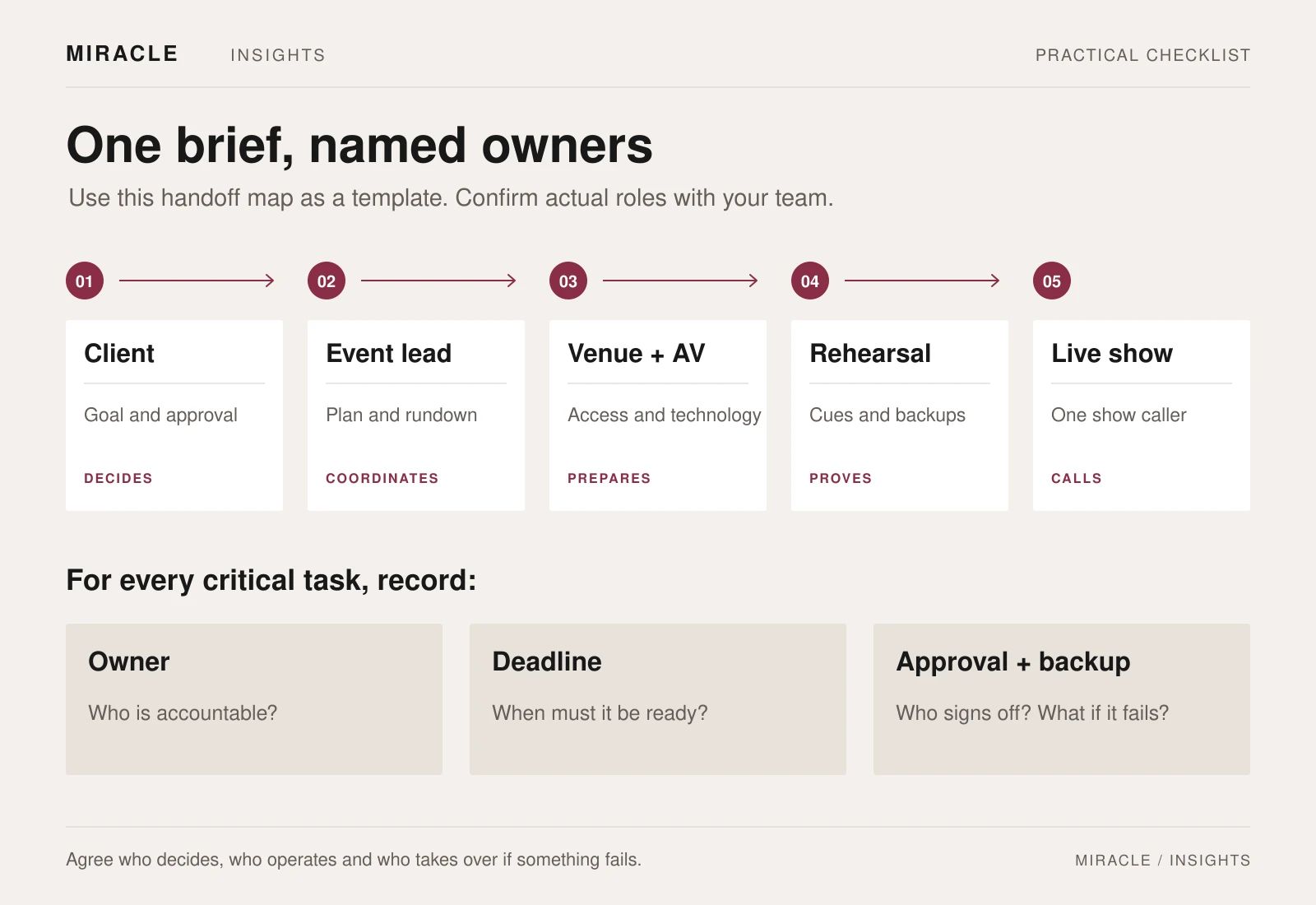
- Give each task an owner and each live decision a clear approval route.
Start your corporate event brief with the audience, purpose, preferred date, venue status, programme and budget. Name the person who can approve changes. These details give the venue and production suppliers a shared starting point.
Attach the floor plan, equipment list, content list and production rundown as they develop. Mark unknowns clearly so suppliers can explain their assumptions in the proposal.
1. Define the purpose and boundaries
Write the main objective in one sentence. For example, a hypothetical product seminar might aim to help invited customers understand a new service and book a follow-up demonstration. That objective helps the team choose the programme, room layout and next step for guests.
Then set out:
- Audience, estimated attendance and guest profile
- Event format, preferred date and location
- Spoken and written languages
- Budget range and what it must cover
- Required outcomes and how your team will assess them
- Client lead, approvers and decision deadlines
Separate essential requirements from optional ideas. If the budget is fixed, ask suppliers to identify trade-offs explicitly rather than quietly removing items from their proposals.
2. Brief the venue as an operating space
Ask for the usable floor plan and the setup conditions. Confirm delivery access, lifts, storage, power, ceiling restrictions and the times available to build and remove the event. Check what condition the room will be in when your team receives it.
Walk through the guest journey: arrival, registration, seating, presentation, breaks and departure. Include accessible routes and ask participants about access requirements early enough to plan appropriate support.
Record which venue facilities and staff are included, which need to be booked separately, and any requirements for external suppliers. Keep catering, cleaning, security, furniture and waste arrangements visible in the scope.
Connectivity deserves a specific question. HKCEC, for example, distinguishes complimentary Wi-Fi, premium services and chargeable fixed broadband in its technical support information. Ask your chosen venue which service suits the actual event rather than treating “Wi-Fi available” as a complete answer.
3. Turn the programme into an AV brief
Describe what people will see and hear during each part of the event. From that description, the audiovisual team can propose the screens, sound, lighting, playback and staffing required.
Include the number of speakers on stage together, audience questions, panel discussions, demonstrations and remote contributors. List the content types: presentation slides, opening film, holding slides, sponsor acknowledgements or a live camera feed.
Ask the AV supplier to confirm:
- Screen layout and required content dimensions
- Microphone plan, including audience questions
- Playback equipment and who operates it
- Lighting for speakers, cameras and any demonstrations
- Audio feeds for recording, streaming or interpretation
- Internet and remote-speaker arrangements where needed
- On-site technical cover and backup provisions
Specify captions, interpretation or assistive listening requirements as part of the brief. The W3C accessible events checklist recommends coordinating the necessary audio connections and display arrangements with the relevant service providers. Include these checks in rehearsal rather than leaving them to the doors-open period.
4. Build a rundown that the crew can use
A guest-facing agenda lists sessions. The production rundown also records what must happen between them.
For each segment, include the planned start, duration, speaker, screen content, microphone requirement, lighting or sound cue, operator and instruction for moving on. Use consistent file names so the playback operator can identify the approved asset immediately.
A hypothetical seminar opening could read:
- Guests enter: holding slide and agreed background audio; registration lead confirms readiness
- Opening film: playback operator starts the approved file on the show caller's cue
- Welcome: stage lead confirms the host is ready; sound operator opens the assigned microphone
- Presentation: approved slide deck is loaded; the presenter and operator agree slide control
- Questions: audience microphone runner follows the host's direction
Assign one person to call the live cues. Decide who can shorten a session, delay a start or approve a change, and how those decisions reach the operators.
5. Make supplier responsibilities explicit
“One-stop service” still needs an agreed scope. Use a responsibility checklist with a named delivery owner, an approver and a due date for each item. Write “to be confirmed” where a decision is genuinely open.
Cover venue liaison, registration, stage and backdrop, AV, event content, catering coordination, gifts, activity booths, photography, filming and post-event delivery as relevant. For each supplier, specify what they provide, install, operate and remove.
Check the joins between suppliers. Who sends the venue's screen specifications to the video editor? Who checks speaker names on the final slides? Who gives catering the approved break time? Who receives and counts delivered gifts?
Miracle's event management and production service brings event planning and production requirements into one discussion. Its Sennheiser Connect and Collaborate Roadshow case page is a useful starting point for discussing the type of event support your brief requires.
6. Plan approval, rehearsal and contingencies
Set deadlines for speaker details, presentation decks, videos, graphics and translations. Identify who approves each item and when the production team receives the final version. Keep a visible version number and remove superseded files from the live playback folder.
Allow a technical rehearsal that checks the actual content, microphone handovers, remote connections and transitions. Agree which speakers need to attend and what must be tested if someone cannot join.
Document responses to a late speaker, failed playback, connectivity loss or a delayed delivery. For weather disruption, agree the decision owner, venue coordination and guest-notification process in advance. Ask suppliers how postponement or cancellation would affect their charges; record the agreed terms rather than assuming they are consistent across the team.
7. Include the work after the event
If you need edited photographs, a highlights film or session recordings, define them before the event. List coverage priorities, formats, review stages, intended use and delivery dates. Confirm the arrangements for filming and photography with your organisation and venue.
The closing checklist should also cover venue handback, supplier collection, final cost reconciliation and a short review of the event against its objective. Name the person responsible for each remaining action.
Start with the decisions you already know
Send Miracle your event brief with the event objective, estimated audience, preferred date, venue status, programme outline and budget range. Add the services you need help with and any fixed constraints, so the discussion can focus on a workable production plan.
Frequently asked questions
How long should the initial brief be?
Keep the main brief short enough for every supplier to read. Put detailed technical schedules, floor plans and the rundown in clearly labelled attachments with version dates.
What if the venue has not been selected?
State the preferred area, audience size, layout, date flexibility and essential requirements. Mark the venue as unconfirmed and ask suppliers to make their assumptions explicit.
Do we need a separate AV supplier if the venue has equipment?
Confirm the exact equipment, operators, operating hours and support included in the venue package. Compare those details with the programme before deciding what additional provision is needed.
Who should own the final rundown?
Choose one event lead to maintain the approved version and distribute updates. Also name the show caller who will coordinate live cues; the two roles may be held by the same person if agreed.
Planning something similar?
Talk to Miracle