

How to Give Video Edit Feedback That Prevents Avoidable Rework
Give the editor a clear next decision. Use stage-specific review instructions, timecoded feedback, a worked conflict example and a copyable revision record.

- Identify the cut and purpose of the review before collecting comments.
- Pair each timecode with the observed problem, desired outcome and any exact replacement.
- Resolve conflicts into one instruction and check the result in the next actual version.
“Can we make it more dynamic?” may express a genuine concern, but it leaves the editor to guess whether the problem is the opening, the shot selection, the music or the message. When another reviewer asks for a slower pace, the next cut becomes an attempt to reconcile decisions nobody has made.
Useful feedback gives the editor a location, a problem and an agreed outcome. You do not need editing terminology. You need a consistent review process that distinguishes factual corrections, creative choices and questions still waiting for a decision.
Here is a practical method for a marketing or communications coordinator managing several reviewers, followed by templates you can reuse.
Tell reviewers what this cut can establish
Before circulating a link, ask the production team what is ready to judge. An early cut may be for story and interview selection. A later cut may include developed graphics and a sound mix. State the current purpose instead of asking everyone to review everything.
Use three broad passes, adapting them to the agreed project:
- Story review: message, sequence, interview selection and missing information.
- Detail review: factual wording, graphics, captions, names and visual consistency.
- Delivery review: the requested changes, final presentation and specified output versions.
These are review priorities, not a rule that every project needs three formal rounds. Check the agreed scope. If a temporary element prevents a useful decision, flag that dependency rather than pretending the story can be assessed independently.
Invite people whose approval could change the message early enough to act on their input. Confirm one coordinator and one person authorised to resolve competing requests.
Send a review note with the link
Copy and complete this short note:
“Please review [version name and link]. This round covers [decisions required]. [Music/graphics/other elements] are temporary. Check against [brief or approved copy]. Add comments by [agreed deadline] using a timecode and the outcome needed. Send factual replacement wording with its approved source. [Coordinator] will consolidate feedback; [decision-maker] will resolve conflicts.”
Verify the link opens the intended version. Keep earlier cuts labelled clearly and do not send an attachment called “final” while asking for substantial changes. A stable version identifier makes every later comment easier to interpret.
Where confidentiality matters, use the agreed review access and audience. A convenient public link should not silently replace the project's sharing arrangements.
Watch twice, with two different purposes
On the first pass, watch the whole film without pausing. Write one sentence describing its main point. If that sentence differs from the brief, investigate the story before polishing individual transitions.
On the second pass, locate the moments causing a problem. A slow section might repeat an earlier point, introduce unexplained terminology or simply hold a shot longer than needed. Describe what you experience before prescribing a technique.
Check the intended viewing context where practical. If the main audience will watch on a phone, read the important titles at a representative size. If a film is intended to work without sound, review whether the necessary meaning is available in that version. These checks should reflect the actual brief, not add unrequested deliverables midway through review.
Use a five-part feedback comment
A useful comment contains:
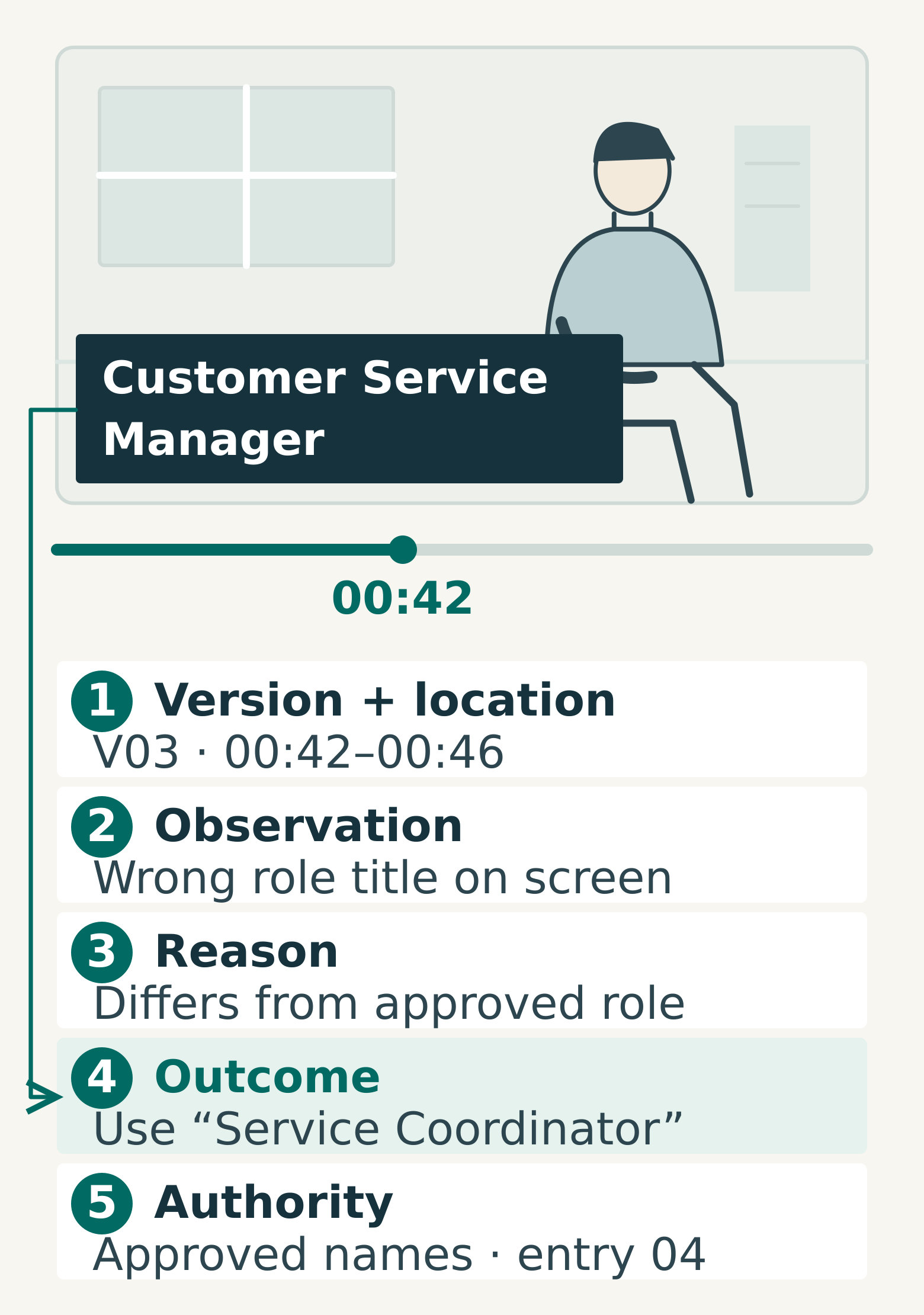
- Version and location: the cut plus a timecode or range.
- Observation: what currently happens.
- Reason: why it creates a problem for the intended viewer or brief.
- Desired outcome: the correction or decision needed.
- Authority: exact replacement wording, reference or approver where relevant.
For example: “V03, 00:42–00:46. The title says ‘Customer Service Manager’. The approved role name is ‘Service Coordinator’. Replace the title with ‘Service Coordinator’; see the approved names list, entry 04. Required correction.”
For a creative concern: “V03, 00:18–00:29. Two interview answers repeat the opening point. Please retain one clear explanation and propose a tighter sequence. Keep the context needed for the speaker's meaning.”
A timecoded review tool can attach a comment to a particular frame; Frame.io's commenting guide describes that workflow. A shared document can also work if the version and locations are unambiguous. For frame-level precision, agree the timecode convention with the editor; minute-and-second references may be enough for a broad section comment.
Resolve conflicts before they become edit instructions
Mark comments as required correction, requested improvement or question. Then consolidate duplicates and identify contradictions. These categories help prioritisation; the coordinator must still judge each issue against the brief.
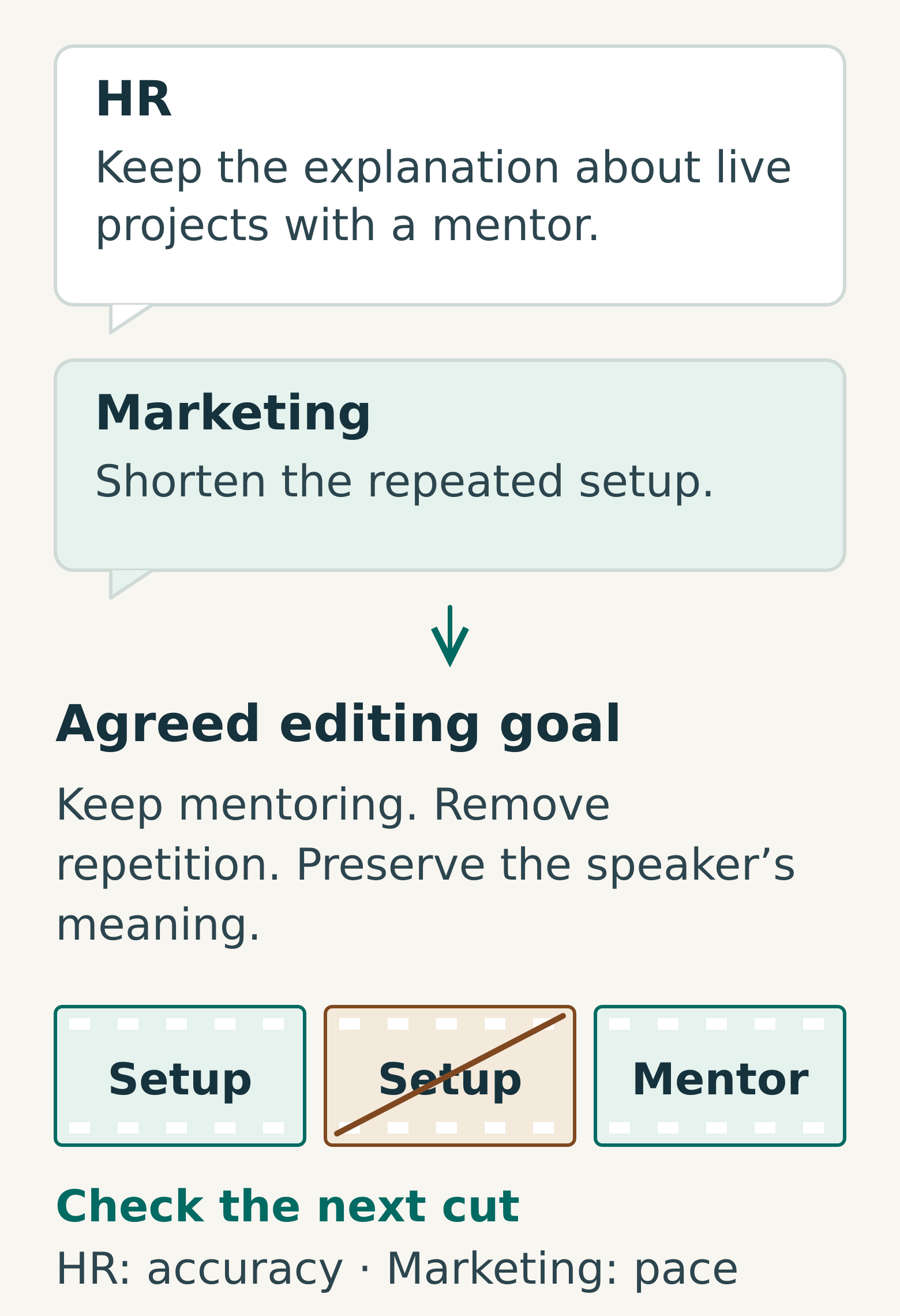
Consider a hypothetical recruitment film. HR wants to retain an employee's explanation that new starters handle live projects with a mentor. Marketing wants to shorten the section because the film repeats the same reassurance elsewhere.
The unresolved requests are “keep the full answer” and “cut this section”. A useful joint instruction is: “Preserve the fact that new starters work on live projects with a mentor. Remove the repeated setup and propose a shorter selection that keeps the speaker's meaning. HR will confirm accuracy; marketing will review pace.”
That instruction identifies the non-negotiable information and leaves the editor room to solve the pacing problem. If the available footage cannot support it cleanly, the editor can explain the constraint rather than attempting incompatible changes.
Send one settled set, with open questions visible
Use a dated feedback record tied to one cut. Give each item a short identifier so it can be followed through the next version. Do not rely on the original timecode alone: timings may move when an earlier section is shortened.
A copyable record looks like this:
- Feedback ID:
- Source cut and timecode/range:
- Category: correction, improvement or question:
- Observation and reason:
- Agreed outcome:
- Exact replacement or approved reference:
- Decision owner:
- Status: awaiting decision, ready for edit, applied or verified:
- Revised cut and new location:
- Verification note:
Keep “applied” separate from “verified”. An editor can report that a change has been made; the appropriate reviewer still needs to confirm the result. If an item changes the agreed scope, ask about the effect on work and timing before turning it into an instruction.
Check the next cut in context
Review the requested changes, then watch the surrounding transitions. Removing one answer may leave a pronoun without a clear subject, a visual reference without its explanation or an abrupt sound transition. A local correction should still make sense within the film.
Record final approval against the actual version and the scope of that approval. If several language or aspect-ratio versions are required, make their review status explicit. Approval of the main cut should not be used as an unexplained sign-off for files nobody has checked.
For your next review, rewrite three vague comments using the five-part format before sending the feedback set. If you still cannot state the desired outcome, mark the item as a question for discussion. Discuss your corporate video review process with Miracle.
Frequently asked questions
Should everyone send comments directly to the editor?
Agree the workflow first. A shared review tool can collect comments efficiently, but the coordinator should resolve duplicates and conflicting instructions before they become a revision request. Make clear which comments are settled instructions and which are still questions.
What if we know a section feels wrong but cannot suggest a technical fix?
Describe the viewing problem and point to its location: the message is unclear, a title is hard to read, the sound distracts from speech or the sequence feels repetitive. State what the viewer should understand or experience, then ask the editor to propose an approach.
Should we raise a problem that appears after approval?
Yes, particularly if it affects accuracy or the agreed purpose. Explain the new evidence or reason for reopening the choice, identify the affected version and ask about the impact of correcting it. A documented approval baseline helps assess changes; it should not hide a known problem.
Planning something similar?
Talk to Miracle