

Planning bilingual corporate video: voiceover, subtitles and approvals
Plan English and Chinese corporate-video versions before production. Separate spoken language, on-screen copy, subtitles, accessibility captions and approval responsibilities.

- Specify spoken language and written language separately.
- List the versions you actually need before scripting and recording.
- Approve language, captions and final playback as distinct checks.
Specify the language of every layer
For each video version, specify the spoken language, on-screen text and subtitle or caption treatment. “English and Chinese” leaves too many production decisions open.
For a Hong Kong corporate video, specify whether spoken Chinese means Cantonese, Mandarin or another requirement. Separately confirm Traditional or Simplified Chinese for written material. The audience, purpose and publishing destination should guide those decisions.
Put those choices into a version list before writing the script. The team can then plan the recording, graphics, text tracks and approvals for each output.
1. Build a version list before the script
Give each required output a row in a simple register. Record its audience, destination, spoken language, on-screen copy, subtitle or caption treatment, frame shape and approver.
Here is an illustrative structure, not a prescribed package:
- Output: Website introduction;
Spoken audio: English;
On-screen copy: English;
Text track or visible text: Reviewed English captions; other languages as required;
Approval: Named content owner - Output: Local-language edition;
Spoken audio: Cantonese;
On-screen copy: Traditional Chinese;
Text track or visible text: Agreed Chinese text treatment;
Approval: Named language reviewer - Output: Event-screen edition;
Spoken audio: As required by the programme;
On-screen copy: Agreed event language;
Text track or visible text: Visible text suitable for that playback setup;
Approval: Event and content owners
Not every combination needs to be produced. Choose the editions people will use, then confirm their technical requirements with the publishing or event team.
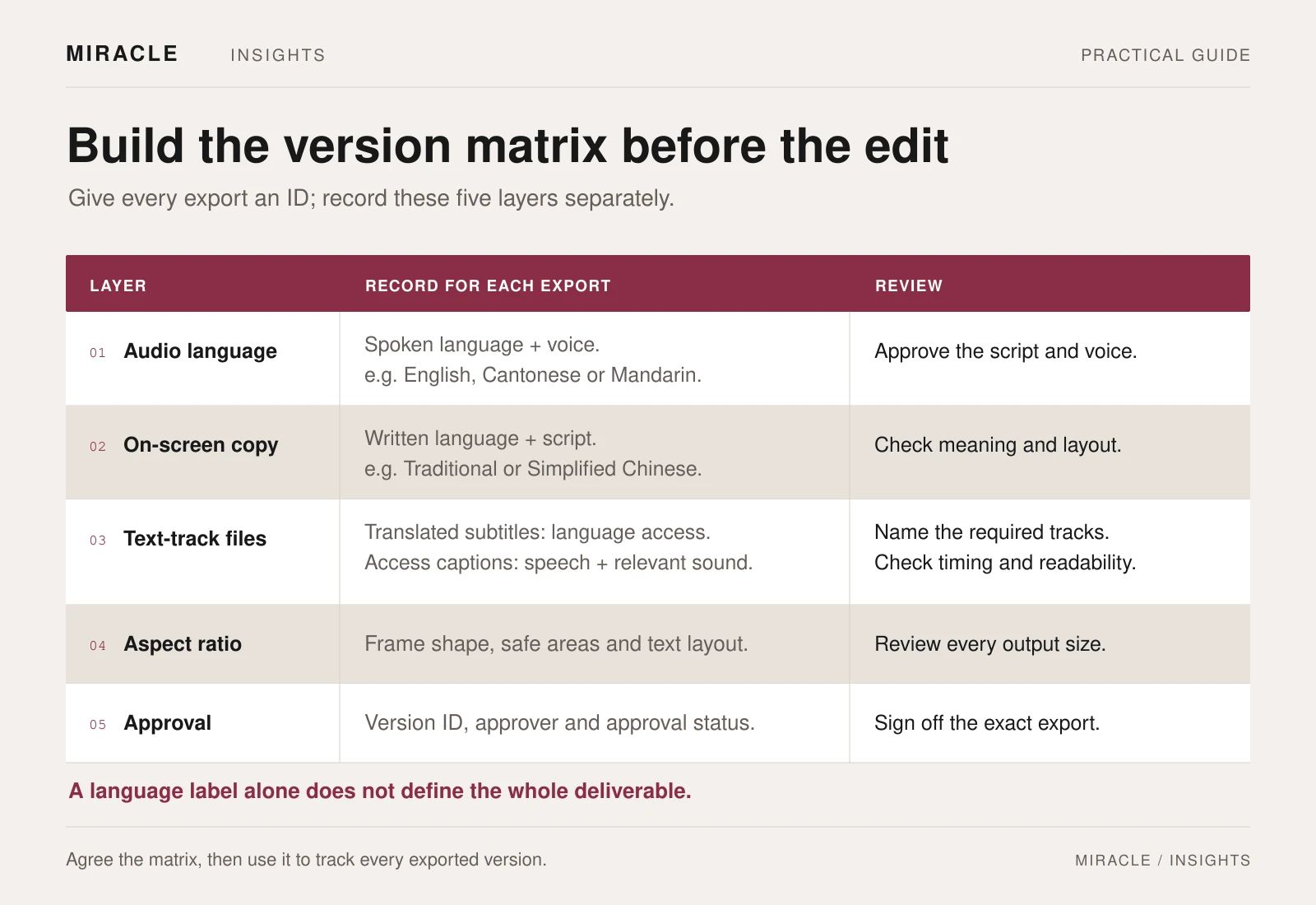
2. Create a shared message and terminology sheet
Agree the central message, supporting facts and intended next step before adapting the script. Record approved organisation names, product terms, job titles and pronunciations.
Prepare the spoken scripts for their audiences. Read them aloud and check them against the proposed visuals. A sentence that is clear on paper may need a different rhythm when spoken; each language version needs its own timing review.
Identify statements that require a particular person's approval. Keep the source and approved wording alongside the script so reviewers can check meaning without searching through old messages.
If a speaker will appear on camera, decide which language they will speak and whether an additional take is needed. That is a production decision to make before the interview is recorded.
3. Separate on-screen copy from subtitle files
List every piece of text that appears within the picture: opening titles, names, job titles, diagrams, product labels and the closing contact details. These may need language-specific design even when the underlying footage is shared.
Then decide how subtitles and captions will be delivered. Text rendered into the video is always visible. A separate timed text track can be switched on or off when the player supports it. W3C describes this distinction in its caption guidance.
Review the complete frame with the text in place. Check that names, graphics and subtitles do not compete for the same space. If a vertical edition is required, approve that layout separately rather than assuming the horizontal layout will transfer unchanged.
4. Be clear about subtitles and accessibility captions
Terminology varies between teams, so define it in the brief. For this workflow, translated subtitles convey speech in another language. Accessibility captions also include relevant non-speech audio and speaker information needed to understand the content. W3C explains these distinctions and cautions that automatic captions require accuracy checks. W3C captions and subtitles
For Chinese text, agree the written form and editorial approach. The reviewer should check that the result accurately conveys the speaker's meaning, including names, qualifications and important wording.
Decide whether a transcript is also needed. A descriptive transcript can include important visual information alongside speech and sound. It serves a different reading experience from timed captions. W3C transcript guidance
Include the required access features in the initial scope. A translated subtitle file on its own does not establish that the complete video experience meets an accessibility standard.
![Two hypothetical frames show the same device with Cantonese audio and English text. A translated subtitle says “The cycle is complete.” A translated access-caption example also includes “[completion chime]” and identifies the technician speaking off screen. These frames are not a complete accessibility specification.](https://cdn.sanity.io/images/tjoywp79/production/74db3ecf38e52528f595a30c6e20781176d6a585-1600x3329.webp?auto=format&fit=max&w=2000&q=80)
5. Use approval checkpoints that match the work
Agree who signs off each of these stages:
- Message and facts: the content owner checks the substance.
- Language scripts: reviewers check meaning, terminology and pronunciation.
- Visual text: reviewers check names, graphics and written versions.
- Edit and timing: the team reviews narration, picture and text together.
- Final exports: the publishing owner checks the files in their intended player or setting.
Keep feedback tied to a specific file version and timecode. If a correction changes the approved source wording, mark every affected edition for review.
A translation correction can change narration length, graphics and subtitle timing. Check those dependencies before closing the correction, then update the version list so an earlier export is not published by mistake.
6. Test the delivery in the actual destination
Specify the required video files, clean versions where agreed, caption or subtitle files, transcripts and cover images. Name files consistently and include a delivery register that says which audience and destination each one serves.
Confirm the destination's supported text-track format. For example, YouTube publishes its own supported subtitle and closed-caption file guidance. That does not establish what a different website player or event system supports.
Upload a test where possible. Check language labels, character display, synchronisation and whether the selected captions actually appear. For an event, have the playback team test the intended file rather than relying on a browser preview.
7. Brief the work as a connected set
The most useful brief includes the core message, audiences, languages, destinations, output list, existing material and approval owners. Add any fixed release date and the point by which scripts must be approved for recording.
Miracle's video production services and brand-content services can be discussed around this version list. It gives the conversation a clearer scope than a request for “bilingual video” alone.
What to include in the video brief
Include the audiences, spoken and written languages, publishing destinations and available scripts. Identify the versions and review stages your project needs.
Frequently asked questions
Do we need separate English and Cantonese voiceovers?
It depends on the audience and use. Some projects need distinct audio editions; others can use one audio track with translated subtitles. Confirm how and where people will watch before choosing.
Can automatic captions be used as the final files?
Only after appropriate checking and correction. Review meaning, names, technical terms, sound information and timing against the actual edit. An automatic first pass is not evidence of accuracy.
Can one subtitle file be used for every edit?
Only where the spoken content and timing match. Shortened edits, new openings or language changes may require adjusted text and timecodes. Test each delivered combination.
Should we request a version without visible subtitles?
If you expect future localisation or different publishing treatments, discuss a clean export. Specify exactly which text should be absent and retain the separate approved text files where included in scope.
Planning something similar?
Talk to Miracle