

B2B Roadshow Planning: Product Demos, Visitor Flow and AV
Plan a B2B roadshow around useful product demonstrations and clear next steps. Map the visitor journey, demo capacity, AV requirements, staff roles, reset process and follow-up.

- Build each demonstration around a defined visitor need and an observable result.
- Plan the full journey, including questions, waiting time and the reset between sessions.
- Connect AV, staffing and follow-up to the same demonstration plan.
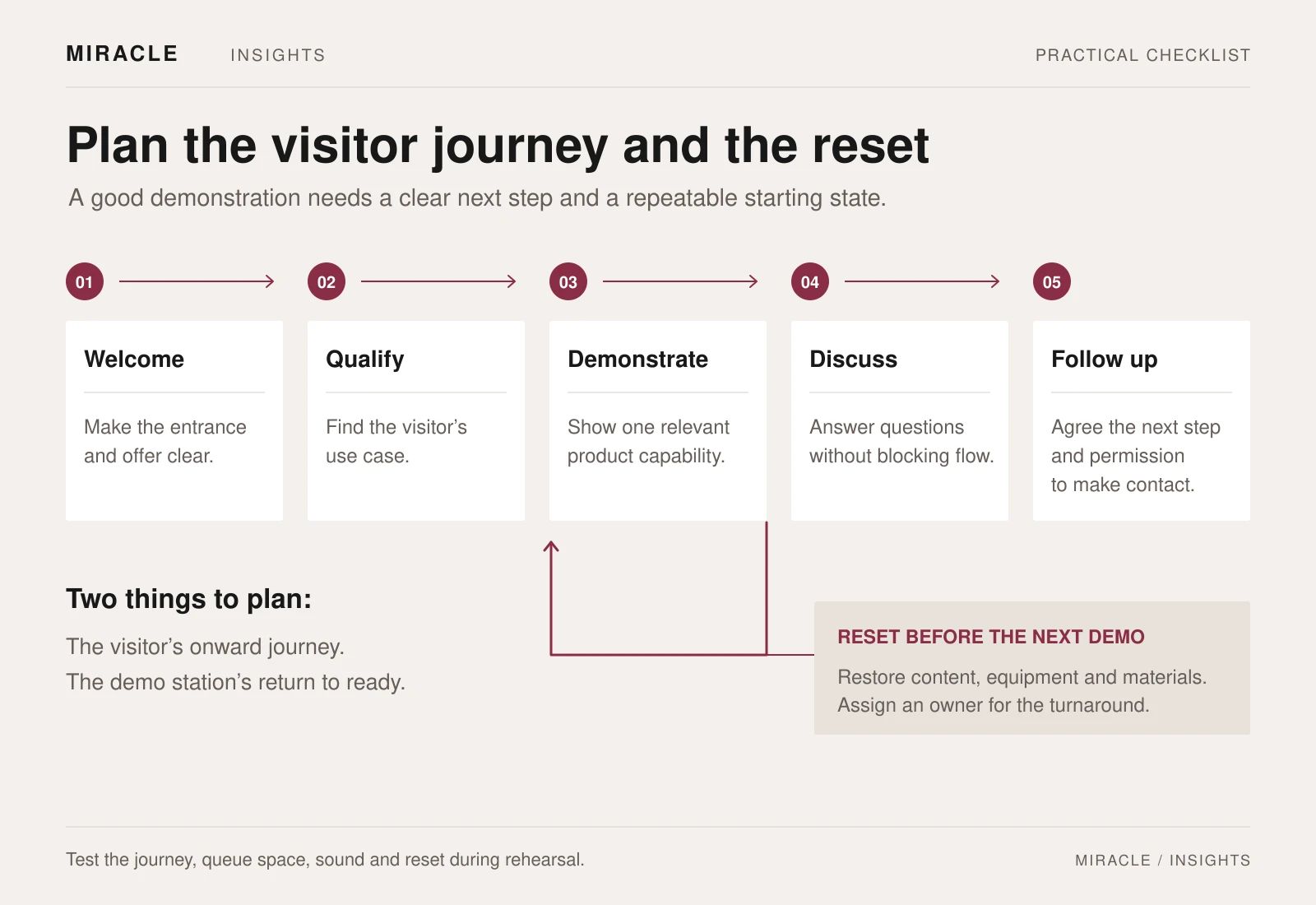
Plan a B2B roadshow around a repeatable demonstration, a clear visitor route and a specific next step. Include the time and people needed to reset each station between sessions.
Start with the visitor’s question. What should a technical buyer, distributor or business owner understand after the demo? Decide which parts need to be experienced and which can be explained briefly.
1. Define the audience and the next step
Identify the groups attending and the questions each is likely to bring. A technical evaluator may want to understand integration; a commercial decision-maker may need a clearer view of the use case and implementation process.
Select a primary purpose for each demonstration. Avoid making one station answer every possible question. Give staff a route for moving detailed technical discussions to the right person without holding up the next group.
Decide what a useful next step looks like: receiving a relevant specification, arranging a site discussion, booking a trial conversation or involving another stakeholder. Use that decision to shape the final part of the visitor journey.
Keep product statements aligned with approved material. If a feature is simulated, planned or shown under particular conditions, make that clear in the demonstration.
2. Design a demonstration with a beginning and an end
Write a short demo script around a recognisable task. Establish the situation, show the action, explain the observed result and invite the most relevant question.
For example, a hypothetical workplace-technology demonstration could begin with a meeting-room challenge, show a configured product handling one task, then explain the setup conditions. This is easier to review than a loosely defined instruction to “show all the features”.
List the exact product configuration, accessories, accounts, connections, content and operator actions required. Use approved demo data instead of real customer records. Record the starting state so another trained demonstrator can repeat the sequence.
Prepare a shorter version for a visitor with limited time and a deeper route for someone with a specific need. Both should lead to the same accurate explanation rather than different, improvised product claims.
3. Map the visitor journey through the space
Sketch five stages: welcome, a short needs discussion, demonstration, questions and the next step. Decide where each happens and what information passes between staff.
Check the layout from a visitor's point of view:
- Can a new arrival tell where to start?
- Is the purpose of each station clear?
- Can people see and hear without blocking circulation?
- Where will a waiting group stand or sit?
- Is there space for a quieter conversation?
- Can visitors leave easily after completing their session?
Keep the route usable for different access needs. The W3C accessible-events checklist recommends planning accessible venues, appropriate sound and support such as captions or interpretation where needed. Ask about requirements early and include the relevant arrangements in the site walk-through.
If several products are demonstrated together, decide whether visitors follow a guided sequence or choose stations independently. The staffing and timing plan should match that choice.
4. Plan capacity around the whole session
Allow for the introduction, demonstration, questions and reset. Measure the cycle during rehearsal instead of estimating from the presentation script alone.
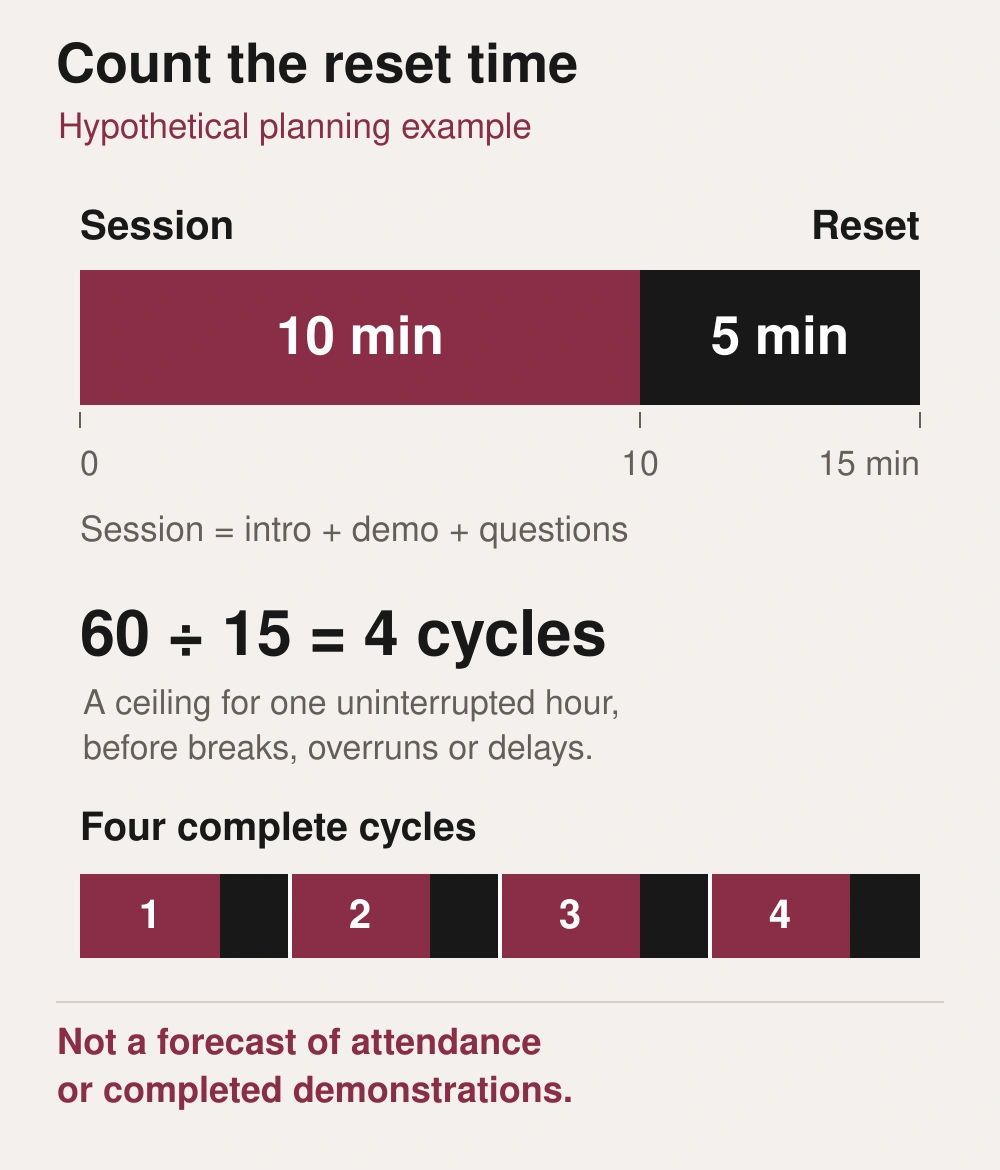
For a hypothetical station, a ten-minute session followed by a five-minute reset creates a 15-minute cycle, or at most four cycles per hour before breaks and interruptions. This is a planning ceiling, not a forecast of attendance or completed demonstrations.
Use that exercise to decide whether to offer booked slots, repeat group sessions, another station or a separate question area. Leave room for late arrivals and discussions that need more attention.
Find the bottleneck: one product unit, a specialist presenter, a narrow entrance or a slow reset. Use it to adjust bookings, staffing or the layout before adding more equipment.
5. Give the AV team the demonstration requirements
Describe the experience each station must support. Specify what the audience hears directly, what needs amplification, what appears on the screen and whether a close-up camera is needed for small product details.
Check neighbouring stations together. Agree how spoken presentations, product sound, screen playback and background music will coexist. An audio demonstration, for example, needs its listening conditions considered as part of the experience.
For connected products, document the required network, accounts, permissions and fallback arrangement. Ask the venue and technical suppliers to confirm the actual setup. Keep an approved offline explanation or recorded demonstration available where it can usefully support a failed live sequence, and clearly identify it as a recording.
Test the complete arrangement with the intended equipment and content. A successful laptop preview does not confirm that a live product, screen, sound system and network work together in the venue.
6. Assign the live roles and the reset
Name the greeter, demonstrator, technical support contact and person responsible for the next step. One person may hold several roles, but those responsibilities should still be explicit.
Create a station checklist covering startup, demonstration, reset and shutdown. Include batteries or power, cables, approved software state, presentation files, accessories and the condition of the demonstration unit.
Rehearse an interrupted session as well as a smooth one. Agree who explains a delay, who troubleshoots and when to use the fallback. Give staff an approved route for questions they cannot answer, rather than expecting them to improvise.
For a multi-stop roadshow, keep a master equipment inventory and a venue-specific adaptation sheet. Record changes to the layout, power, connectivity, access and staffing at each stop while preserving the approved core demonstration.
7. Make follow-up specific and review the event
Use your organisation's approved registration and follow-up process. Capture only the information needed for the agreed next step, explain that step clearly and assign an owner.
Record the visitor's topic of interest and the action agreed, rather than relying on a stack of unannotated business cards. Keep technical questions that need a response visible until the right team has answered them.
After the event, review completed demonstrations, common questions, waiting times, technical interruptions and agreed follow-up actions.
For a relevant visual reference, see Miracle's Sennheiser Connect and Collaborate Roadshow. Discuss the requirements of your own event through the event management and production service.
Plan the demonstration and the event together
Include the products, intended audience, locations or venue shortlist, expected visit pattern, demonstration requirements and budget range. Specify the desired next step for visitors so the experience and production plan support the same objective.
Frequently asked questions
Should visitors book demonstration times?
Consider booking when the product, specialist or demonstration space is a limiting resource. Use rehearsal timings and expected arrival patterns to choose an approach.
How much product detail belongs in the main demo?
Include enough to complete the defined task accurately. Offer a separate route for deeper technical questions so the main demonstration retains a clear beginning and end.
Can the same setup be reused at every venue?
Keep the core demonstration consistent, but verify each venue's layout, access, power and connectivity. Document the adjustments rather than assuming the previous arrangement will transfer unchanged.
What should we measure after the roadshow?
Choose measures linked to its purpose, such as completed relevant demonstrations, questions resolved and agreed follow-up actions. Review operational issues alongside audience response.
Planning something similar?
Talk to Miracle