

Annual report website, PDF or flipbook: how to choose the right format
Compare an annual report website, downloadable PDF and online flipbook by reader needs, mobile use, accessibility and maintenance. A practical guide for Hong Kong organisations.

- Choose formats around how people will read, find and save the report.
- A PDF, website and flipbook can work together, provided their content stays aligned.
- Include accessibility, approval and long-term access in the production brief.
The short answer
Start with a downloadable PDF and a clear report landing page if readers mainly need to find, save and share the publication. Add HTML chapters when people need to explore specific topics on screen. Choose a flipbook when browsing the designed spreads is an important part of the experience.
These formats can work together. Give each one a job: a quick introduction, a route into a chapter, or a complete edition to keep. Publishing the same content in more places also means checking and maintaining more versions.
For Hong Kong teams, include the required languages and approval owners in that decision. Confirm any separate reporting, filing or distribution requirements with the people responsible for them.
Choose a PDF for the complete edition
A PDF keeps the publication in a fixed page layout. It suits readers who want to download the whole report, read offline, print a section or refer colleagues to a particular page.
Google includes PDF among its supported indexable file types. A PDF is not automatically excluded from search, although indexing is not guaranteed. Choose the format around reader needs rather than assuming that a website always ranks better.
Make that edition easy to use: give it a clear filename and document title, add bookmarks, check the links and review the file size. Offer chapter downloads when readers regularly need only part of the report.
Accessibility needs preparation too. W3C describes techniques for tagged headings, bookmarks and logical reading order. Check the actual document, especially multi-column pages, rather than judging access from its appearance.
Try reading a dense spread on a phone. If it takes repeated zooming and sideways scrolling, identify which sections would benefit from a responsive web version.
Choose a website for a guided reading experience
An annual report website can be a short introduction with downloads or a fuller set of HTML chapters. The right scope depends on what readers need to find and understand online.
Before rebuilding every page in HTML, list the sections that deserve their own reading experience. Each extra chapter brings content entry, language checks, testing and future maintenance.
Keep the report year, language choice, main sections and downloads easy to find. Readers should be able to reach these without waiting through an animated introduction.
Hysan’s public 2025 online edition shows one approach: theme-led sections sit alongside a full-report download and separate chapter PDFs. The opening screen below, also shown in Miracle’s Hysan project page, establishes the report’s visual theme.

What to notice: the opening artwork gives the edition an identity; the separate download panel gives readers a choice between the complete publication and named sections. These elements serve different reading needs.
A different approach: chapter-led navigation
The Land Registry’s public 2023–24 report provides a detailed contents menu and presents financial and business highlights on the homepage. Its anniversary section introduces service milestones, staff recollections and historic land records.
What to borrow: let readers choose a route into the report, then give each section a clear subject. A reader looking for financial information and one exploring an anniversary story should not have to follow the same sequence.
Choose a flipbook for browsing designed spreads
A flipbook puts a page-turning interface around the publication. It may suit readers who want to browse the designed spreads, but the proposed viewer needs its own usability checks.
Try three tasks in the actual viewer: find a named section, read a detailed page on a phone and move through the controls with a keyboard. Check search, zoom, text selection, links and language access as part of those tasks.
Keep a clear download route. Ask what happens if the viewer stops loading or the hosting subscription ends. Confirm export options and archive ownership before relying on it for long-term access.
Ask the supplier to demonstrate a representative report in the proposed viewer. A screenshot of a book or a page-turning effect alone cannot show whether readers will be able to find and use the information.
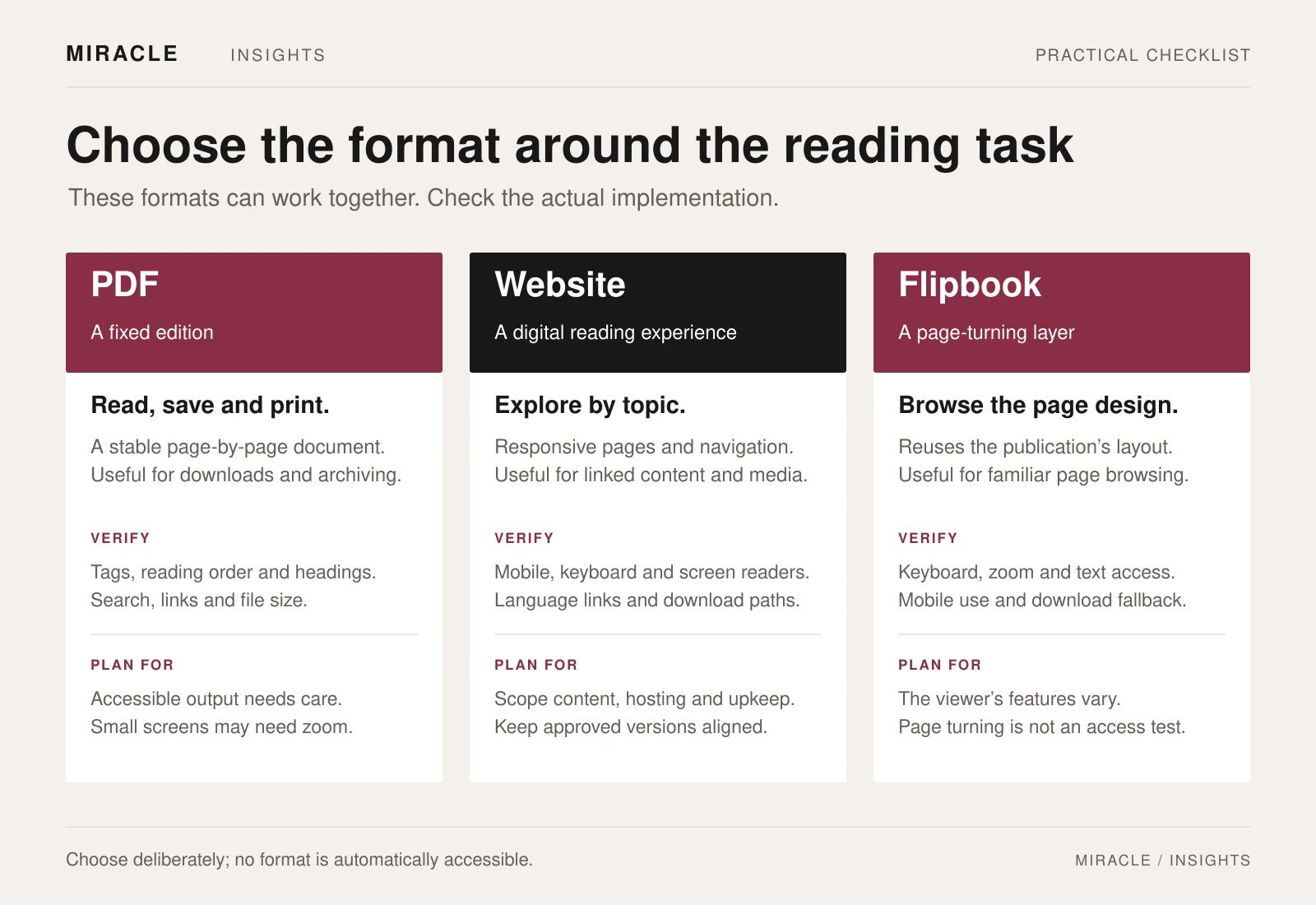
Match the format to the reader’s task
- Reader or team priority: Save or print a complete edition;
A useful starting point: Downloadable PDF;
What to check: File size, links, bookmarks and accessibility - Reader or team priority: Read highlights on a phone;
A useful starting point: Responsive HTML content;
What to check: Text size, navigation and access to the full report - Reader or team priority: Browse the designed page spreads;
A useful starting point: Flipbook, with a download option;
What to check: Viewer controls, zoom and keyboard use - Reader or team priority: Share a particular chapter;
A useful starting point: HTML chapter or clearly labelled chapter PDF;
What to check: Stable links and language matching - Reader or team priority: Keep past editions available;
A useful starting point: An archive covering every chosen format;
What to check: Hosting ownership, renewals and working files
Use these starting points to narrow the brief, then test the proposed document, website or viewer. Accessibility and usability depend on how it is built.
Four decisions to settle in the brief
Which sections need HTML?
Name the sections people are likely to visit directly. A leadership message, strategic priorities or a key development may deserve an HTML page. Keep a clear route to the complete report wherever you publish a summary.
Which languages will each format include?
List the formats and files required in each language, with a named approver. Test the language switch and every download label. A Chinese interface should lead to the intended Chinese document, not an English file with a translated button.
What will accessibility testing cover?
Assess the website, PDF and viewer separately. Include navigation, reading order and access to charts or other visual information. Hong Kong’s Web Accessibility Handbook is a useful starting point for agreeing the scope with the reviewer.
Who will maintain and archive the report?
Record who owns the hosting, subscriptions and working files, and who handles corrections. Decide how this edition will stay available when next year’s report launches. Include those responsibilities in the proposal.
Keep corrections aligned across formats
Use one approved content record for headings, figures, captions and language versions. Track which outputs use each item so a correction reaches every affected place.
For example, if an approved chart caption changes, check the PDF, its HTML summary and any copy inside the viewer. Test the files visitors actually download after the correction is released.
A focused landing page and a well-prepared PDF may be enough. Add an HTML chapter or flipbook when it solves a specific reading need and the team can support it after launch.
Bring a clear brief to the first discussion
Copy these fields into your project brief before asking for proposals:
- Readers and tasks: who will use the report, and what must they be able to find, read or save?
- Outputs and languages: complete PDF, HTML sections, optional viewer and the editions required.
- Inputs and approvals: approved source content, assets, reviewers and the person who resolves conflicting comments.
- Delivery and checks: release date, representative phone and keyboard tests, accessibility review, hosting and archive owner.
Send Miracle your annual-report brief with last year’s public edition, target readers, required languages and publication constraints. Flag the sections you want people to explore online so we can discuss the right combination of publication design and website development.
Frequently asked questions
Can Google find a PDF annual report?
Google lists PDF among its supported indexable file types. A PDF is therefore not automatically excluded from search. Actual indexing is not guaranteed, and a new format alone does not guarantee better rankings.
Is a flipbook automatically more accessible than a PDF?
No. Evaluate the viewer and the content it presents. Test real tasks with keyboard and assistive-technology users where appropriate, and provide a suitable alternative route to the information.
Do we need a full annual report microsite?
Only if the scope serves your readers and publishing needs. A landing page with clear highlights, language choices and downloads may be enough. Ask what each additional HTML section will help someone do.
Can we use all three formats?
Yes, but include the extra content checks, accessibility testing, hosting and maintenance in the brief. Give each format a clear purpose so readers know which option to choose.
Planning something similar?
Talk to Miracle