

How to Approve an Animated Explainer Storyboard Before Production
A scene-by-scene approval guide for corporate explainers, with a worked storyboard, a review checklist and a sign-off template your team can reuse.

- Approve the relationship between narration, pictures and timing, not isolated drawings.
- Resolve factual uncertainty and story changes before detailed animation begins.
- Record exactly which version and elements are approved, with a clear decision on every open item.
A storyboard can look polished while leaving the most important question unanswered: will a viewer understand the explanation? A product team may see a factual shortcut, marketing may see a stronger opening, and management may approve the overall impression. Unless those judgements meet in one decision, the animator receives several different briefs.
Use storyboard review to agree what the film will say, show and ask the viewer to do. This guide gives you a practical sequence, a worked example and an approval record to copy into your next project. It is intended for the person coordinating the review, even if they have never commissioned animation before.
Define what this approval covers
Before sharing the board, ask the production team to name the decisions needed now. A storyboard may establish the story and composition without settling final illustration, character design or animation style. Write down which supporting references are included and which elements are still temporary.
Give reviewers three things: the current storyboard, the agreed audience and message, and a short review note. That note should identify the version, response deadline and final decision-maker. Replace “Please share your thoughts” with a specific request: “Check the sequence, product accuracy and on-screen wording. Final colour and motion polish will be reviewed separately.”
If a decision-maker could reject the central story, involve them at this stage. A final-stage surprise is harder to manage than an early disagreement.
Read the story before inspecting the frames
On the first pass, follow the whole explanation without stopping to adjust colours or individual words. Finish these sentences:
- The viewer starts with this problem or question: …
- By the end, they should understand: …
- The next action available to them is: …
Then give each scene one job: introduce, explain, demonstrate or invite action. Two adjacent scenes doing the same job may be candidates for combining. A claim without a supporting explanation may need another scene, a qualification or removal.
Check the connective logic. Does the film explain what causes a change, or merely show a pleasant result? Does it introduce terminology before relying on it? An audience unfamiliar with the service should not have to supply the missing steps from their own knowledge.
Review a scene as a complete unit
For every scene, inspect the narration, picture, on-screen wording and motion note together. Use these five questions:
- What should the viewer learn here?
- What appears first, and what changes next?
- Which exact words must be read?
- What does the narration add to the picture?
- What would make this scene misleading or hard to follow?
A motion note can be plain English: “The request enters the queue; available appointments appear; one slot is selected.” It need not describe software or animation techniques.
Ask for approximate duration where useful, but do not treat a static board as proof of comfortable pacing. If comprehension depends on the order of several events, request a timed storyboard or simple animatic: a rough sequence of images played against provisional audio. Agree whether that step belongs in the project before assuming it is included.
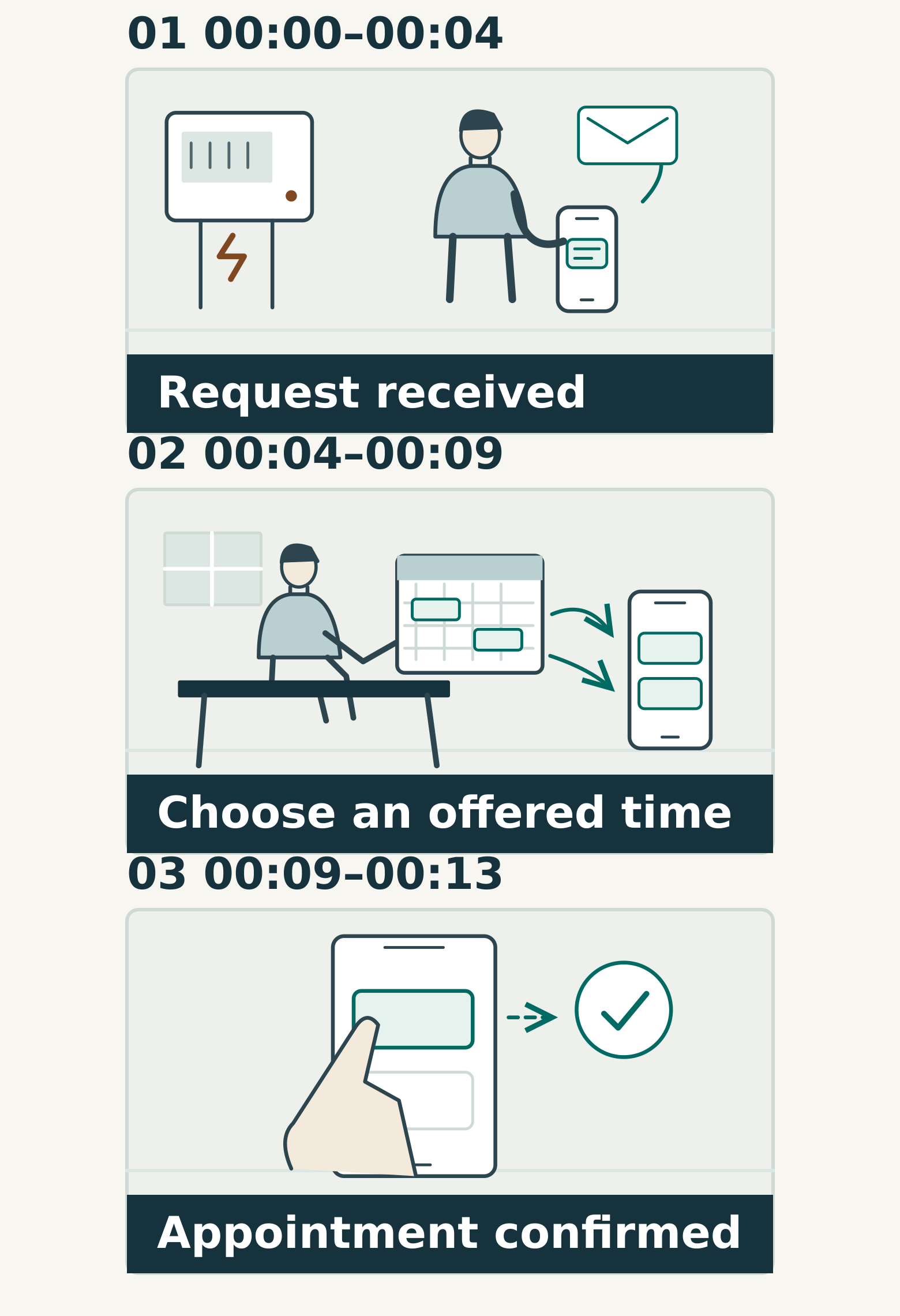
Worked example: a maintenance-booking explainer
Consider a hypothetical facilities company explaining how customers arrange maintenance. The proposed scene jumps from “Submit a request” to “Appointment confirmed”. Operations objects: the service first checks availability and sends options. Marketing wants to avoid making the process look complicated.
The useful question is not which department gets its preferred version. It is which steps the viewer needs to understand accurately. The coordinator agrees three short beats:
- Request received: the customer describes the job.
- Options offered: the team checks availability and sends suitable times.
- Appointment agreed: the customer selects an offered time and receives confirmation.
The board uses one visual card for each state. “Request received” does not use a calendar tick that could imply a confirmed appointment. The middle card keeps the availability check visible without showing internal scheduling screens.
For the next review, the operations owner checks the sequence and the marketing owner checks the clarity of the wording. A rough timed sequence tests whether the three states remain distinguishable. The proposed durations in the illustration are discussion points, not a recommended formula for every film.
Test the text in its viewing context
Place the approved wording inside the proposed layout. A long product name, a qualifier or a second language can change how much information fits in a scene. Do not approve a short placeholder and assume the final paragraph will work later.
Review at a representative viewing size, including a phone when that is a planned destination. Check whether labels can be read without pausing and whether narration competes with a separate, dense message on screen. If the same film needs an exhibition version or a different aspect ratio, identify those versions now; the composition may need adaptation.
For multilingual delivery, agree which wording is authoritative, who approves translations and whether timing will be reviewed in each language. Ask how captions will be supplied and positioned alongside other text. A readable English board is not evidence that every language version is ready.
Turn comments into an approval decision
Sort feedback into three categories. “Required correction” covers inaccurate statements or contradictions with the agreed brief. “Decision needed” covers unresolved story, audience or content choices. “Preference” covers an optional presentation change. These are working categories, not a substitute for a conversation about significance.
A coordinator should remove duplicates and resolve conflicting instructions before requesting the next version. If a preference changes the planned production work, ask the team to explain the effect before accepting it.
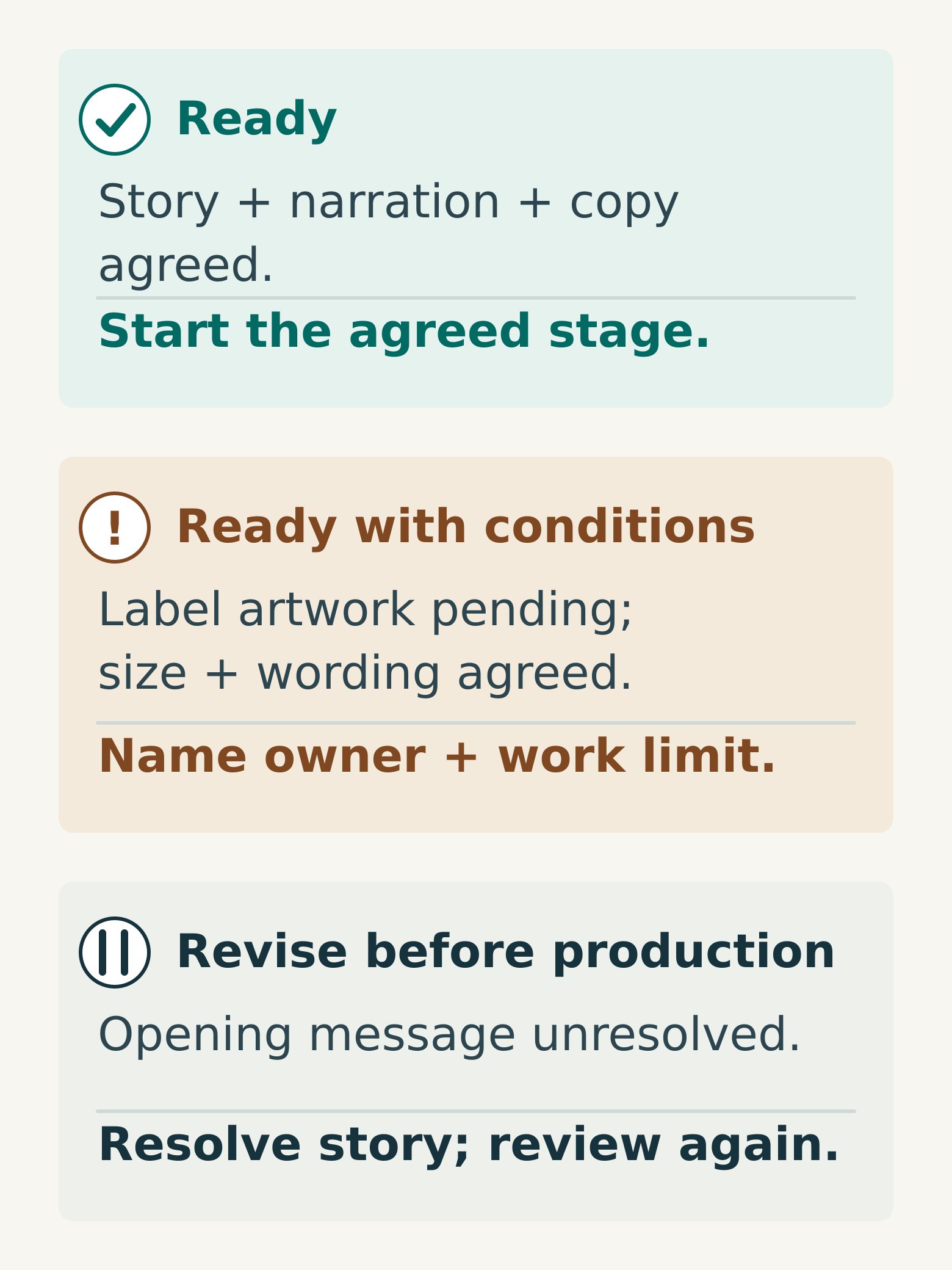
Use three explicit outcomes:
- Ready: the agreed storyboard decisions are settled.
- Ready with named conditions: limited open details have owners, deadlines and an agreed boundary on work that may proceed.
- Revise before production: a central message, sequence or claim remains unresolved.
“Approved, but please rethink the opening” belongs in the last category if the opening establishes the story. Do not let the word “approved” conceal a structural change.
Copy this storyboard approval record
- Project and audience:
- Intended takeaway and next action:
- Storyboard filename, version and date:
- Included references: script, style frames, product references:
- Approved elements: sequence, narration, screen copy, visual treatment:
- Temporary or excluded elements:
- Required corrections and their owners:
- Remaining conditions and when they must be resolved:
- Work authorised to start while conditions remain:
- Final decision-maker and recorded decision:
- How later changes will be assessed:
Keep the approved board and exact copy with this record. A later change can then be discussed against a clear baseline rather than several people's recollections.
For your next review, choose the one scene carrying the most information and run the five scene questions on it. Any uncertainty about order, meaning or accuracy is worth resolving before the team animates the whole film. Discuss your explainer storyboard with Miracle.
Frequently asked questions
Does storyboard approval also approve the final animation style?
Only when that is part of the agreed review. Name the style frames, character designs and other references included in approval. If the board uses rough illustrations, record which visual decisions remain open so nobody mistakes a layout decision for final art approval.
When is an animatic worth requesting?
Ask about one when the explanation depends on timing, multiple transitions, coordinated narration or a tight running time. A rough timed sequence can expose questions that static frames leave unresolved. Confirm the scope and purpose with the production team; it does not need to look like finished animation.
Can a scene change after storyboard approval?
Yes, but first describe the reason and exact change. Ask the production team which completed work and connected scenes would be affected, then agree the impact on scope and schedule. Record the new approved baseline rather than silently replacing the old board.
Planning something similar?
Talk to Miracle